
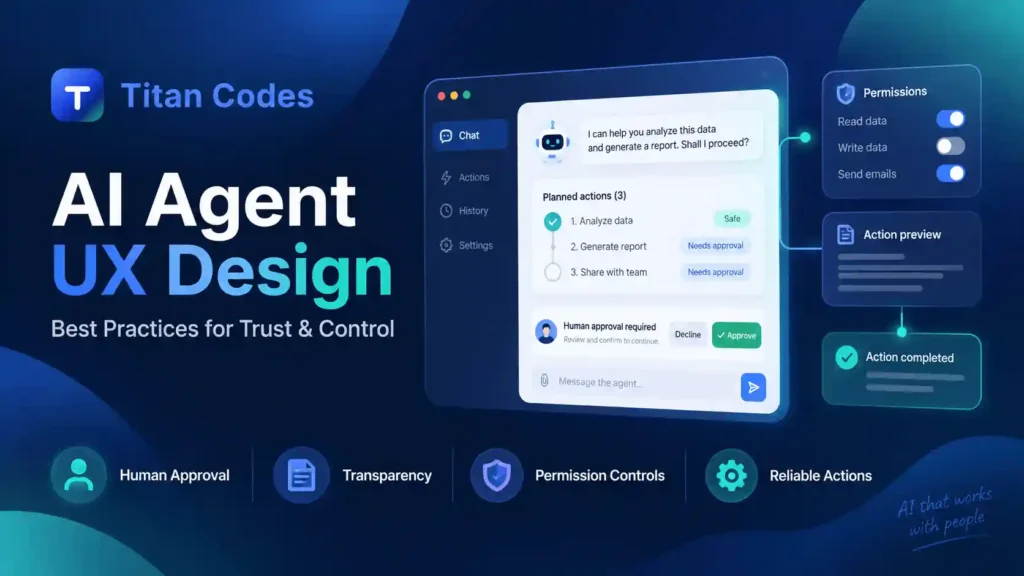
A chatbot can give a bad answer. An AI agent can take a bad action.
That difference changes the design problem.
An agent may search a CRM, update a record, prepare a report, call an API, send a message, schedule an appointment, or complete several steps from a single instruction. The user is no longer clicking through every action manually.
So a good AI agent UX needs to answer some basic questions before users are comfortable handing over control:
What is the agent going to do? What can it access? Which actions happen automatically? When will it ask for approval? Can the user stop it? And what happens if it gets something wrong?
That is where trust comes from. Not from making the interface look futuristic, but from making the agent’s behavior understandable.
Figma’s recent work on agentic products points to the same challenge. As software becomes more autonomous, design teams have to balance capability with trust, security, and a clear sense of control for the person using the product.
What Is AI Agent UX Design?
AI agent UX design is the process of designing interfaces that help people understand, guide, approve, interrupt, and recover from actions performed by an AI agent.
A normal interface usually follows a simple pattern:
User takes an action → System responds
An agent can work differently:
User gives a goal → Agent creates a plan → Agent uses tools → Agent completes several steps → User reviews or intervenes
That extra autonomy is what makes the UX more difficult.
The interface has to support delegation without making the user feel that the software is operating behind their back.
This is why agent UX is not simply chatbot UX with more features. Recent agentic UX guidance increasingly treats planning, permissions, intervention, and recovery as core parts of the product experience.
Why AI Agents Need a Different UX Approach
Traditional interfaces are usually predictable. If you click “Delete,” something is deleted. If you submit a form, the system processes that form.
An agent may decide how to complete the task itself.
That introduces a different set of risks.
| Traditional UX | AI Agent UX |
| User starts most actions | One instruction can trigger several actions |
| The next step is usually predictable | The agent may choose between different paths |
| Feedback is often immediate | Tasks can continue in the background |
| Errors are usually limited to one action | An early mistake can affect later steps |
| The user controls each interaction | Some control is delegated |
| Undo is often straightforward | Some actions may be difficult or impossible to reverse |
The biggest mistake is to hide all of that behind a chat box.
If users type “handle this customer issue” and the system quietly edits records, sends emails, and triggers a refund, the problem is not that the AI is too powerful. The problem is that the product has not made the boundaries clear.
Good agent UX keeps those boundaries visible.
9 AI Agent UX Design Best Practices
1. Show the Plan Before the Agent Starts
For a meaningful multi-step task, users should know what is about to happen.
Consider these two experiences.
Poor experience:
Working on it…
Better experience:
I’ll review the 20 leads, compare them with your qualification criteria, shortlist the strongest matches, and save the results as a draft. I won’t contact anyone.
The second version tells the user much more:
What will happen.
What will not happen.
Where the workflow will stop.
This is especially useful when the instruction is broad.
A user may say, “Clean up these leads,” but that phrase could mean remove duplicates, update fields, delete records, or change statuses. Showing the plan gives the user a chance to catch a misunderstanding before the agent acts.
Smashing Magazine refers to this kind of pattern as an Intent Preview, where the user sees a clear summary before significant actions begin.
2. Make Permissions Easy to Understand
Users should not have to guess what the agent is allowed to do.
A clear interface might show:
| Permission Level | Example |
| Allowed automatically | Search records, summarize documents |
| Approval required | Send email, change account status |
| Blocked | Delete account, change billing permissions |
The important part is not the exact format. It is that the user can understand the boundaries without reading technical documentation.
Titan Codes follows the same principle when planning AI agent development services. Tool access, permissions, restricted actions, approval points, logs, and fallback paths are part of the workflow design, not something added after the agent is already built.
Permissions should also be specific.
“Access Google Workspace” tells the user very little.
“Read calendar events” is clearer.
“Create calendar events after approval” is better still.
3. Ask for Human Approval When the Risk Justifies It
Not every action needs a confirmation dialog.
If the agent asks for approval every thirty seconds, users will eventually start clicking “Approve” without reading.
That defeats the purpose.
A better approach is to base approval on the impact of the action.
| Risk | Example | Recommended UX |
| Low | Search, summarize, classify | Proceed automatically |
| Medium | Create draft, update reversible field | Notify or request confirmation where needed |
| High | Send, publish, delete, purchase, refund | Explicit approval |
A support agent can probably search the order history without asking.
Issuing a $1,000 refund is different.
NIST’s AI Risk Management Framework also recognizes that human oversight requirements vary by context. Some systems can operate with little intervention, while other situations require people to remain directly involved in decisions and oversight.
The useful question is not:
Should humans approve AI actions?
It is:
Which actions are important enough that a human should approve them?
4. Show Useful Progress While the Agent Works
“Thinking…” becomes frustrating very quickly.
Agent workflows often involve several tools and may take longer than a normal UI action. Users need to know whether the system is actually progressing or has become stuck.
A better progress view could look like this:
Customer review
✓ Retrieved order history
✓ Checked refund policy
✓ Reviewed previous support tickets
→ Preparing recommendation
○ Waiting for approval
This is useful information.
Raw technical activity is not.
Users usually do not need to see every API call, model request, or internal system event. They need a simple explanation of where the task stands.
There is an important distinction here:
Progress visibility is not the same as exposing private model reasoning.
The interface should explain what the system is doing, not dump its internal computation onto the screen.
5. Give Users a Real Way to Stop the Agent
If the system is allowed to continue working after the user gives an instruction, the user needs a practical way to intervene.
Useful controls can include:
Pause
Stop
Skip this step
Change instruction
Continue
These controls need to work while the task is running.
Imagine an agent preparing ten customer emails. After reviewing the first two, the user notices that it misunderstood the tone.
They should not have to wait until all ten messages are complete.
Agent UX guidance increasingly treats pause, interrupt, and undo controls as part of the trust infrastructure of an autonomous workflow, rather than optional extras.
6. Explain Actions Like a Person, Not a Log File
A system log might say:
POST /contacts/287/status 200
That may be useful for developers.
It means nothing to the person using the product.
The interface should say:
Changed Maya’s lead status from New to Qualified.
Or:
I selected this account because the company name and email domain match your request.
A useful explanation answers three simple questions:
What happened?
Why did it happen?
What changed?
That is usually enough.
Smashing Magazine makes a similar distinction in its discussion of explainable rationale. The goal is to translate actions into language the user can understand rather than exposing raw system behavior.
7. Admit When the Agent Is Unsure
An agent should not turn uncertainty into confidence just because the interface needs an answer.
Suppose the user says:
Update John’s account.
But the CRM contains four people named John.
A poor system guesses.
A better system says:
I found four contacts named John. Which one do you mean?
The same principle applies when information is incomplete, conflicting, or outside the agent’s authority.
For example:
I found two possible invoices that match this request. Please select the correct one.
Or:
I don’t have enough information to approve this refund.
This can build more trust than pretending the system always knows what to do.
Avoid showing artificial confidence numbers such as “92.4% confident” unless the score actually comes from a calibrated and meaningful system.
Plain language is often more useful.
8. Make Important Actions Reversible Where Possible
People delegate more comfortably when they know they can recover from a mistake.
That can mean:
- restoring a previous version
- reopening a record
- reverting an update
- undoing a classification
- saving content as a draft before publishing
For actions that cannot be undone, the UX should become stricter before the action happens.
Sending an external email, transferring money, deleting important data, or publishing content publicly may require a clear confirmation because there may be no clean rollback.
NIST’s AI safety guidance specifically includes monitoring, modification, shutdown, and human intervention among practical ways to deal with systems that behave outside expected conditions.
9. Give the Agent a Clear Escalation Path
Sometimes the right action is not to continue.
An agent should be able to say:
I can’t determine which contract applies here. Would you like me to send this to the legal team for review?
Or:
This request is outside the actions I’m allowed to perform. I’ve prepared the information for a manager.
That is not a failure.
It is a well-designed boundary.
The dangerous alternative is an agent that feels pressure to complete every task even when the information is unclear.
Escalation should be planned before launch. The product team needs to decide who receives the task, what context gets passed along, and what the user sees while waiting for a person to step in.
How Much Control Should an AI Agent Have?
Autonomy does not need to be all or nothing.
A useful way to design an agent is to increase its freedom gradually.
| Level | What the Agent Does |
| Suggest | Recommends an action |
| Prepare | Creates a draft or plan |
| Ask | Prepares the action and requests approval |
| Act | Completes approved low-risk actions |
| Autonomous | Runs defined workflows within agreed limits |
A new customer-support agent, for example, might begin by recommending responses.
Once the team understands where it performs well, it could be allowed to prepare drafts.
Later, it might automatically close simple requests that meet very clear rules.
This approach is safer than launching with maximum autonomy and trying to remove permissions after something goes wrong.
NIST similarly notes that human-AI configurations can range from fully manual to fully autonomous, depending on the use case and level of risk.
Human Approval Without Approval Fatigue
Human approval sounds safe until the product asks for it constantly.
Imagine a sales agent that asks:
Approve?
after reading the CRM.
Then again after finding a contact.
Then again after writing a note.
Then again before saving the draft.
By the time the important confirmation appears, the user may already be clicking automatically.
Approval should be saved for moments where it matters.
Searching, summarizing, classifying, or preparing reversible drafts can often happen without interruption.
Sending an email, publishing content, deleting information, changing access permissions, issuing refunds, or making purchases deserves more attention.
Good oversight is not about adding the most confirmations.
It is about putting them in the right places.
Example: Designing a Customer Support Agent With User Control
Imagine a customer writes:
My order arrived damaged. I want a refund.
The support agent receives the request.
First, it checks the order details and previous support history. No approval is necessary because it is only reading information.
Next, it checks the company’s refund rules.
The interface tells the support employee:
This order is eligible for a refund under the damaged-item policy.
The agent recommends refunding $120 and shows the order and relevant policy.
At this point, the workflow stops.
Refund $120 to the original payment method?
The employee reviews the information and approves.
Only then does the agent process the refund.
Afterward, it drafts the customer response and shows a simple activity summary:
$120 refund issued. Customer reply prepared as a draft.
This workflow still saves time, but the person remains involved at the point where money leaves the business.
That is what good agent UX looks like. Automation handles routine work, while control stays where the consequences become more serious.
Common AI Agent UX Mistakes
Many agent experiences become difficult to trust for fairly simple reasons.
The most common problems are treating every agent like a chatbot, hiding what it is doing, giving it broad permissions from the start, asking for approval too often, providing no useful stop control, and designing only for the perfect happy path.
Failure states matter just as much.
What happens if one tool succeeds and the next one fails?
If the agent updates five records and stops on the sixth, does the user know which five changed?
Can the system resume?
Can it roll the changes back?
Those questions belong in the UX design process, not only in engineering.
How to Measure Whether AI Agent UX Is Working
A beautiful interface does not tell you whether users trust the system.
Behavior does.
Useful measures include:
| Metric | What It Helps You Understand |
| Task completion rate | Whether users reach the intended outcome |
| Interruption rate | How often users feel the need to take control |
| Approval rejection rate | Whether proposed actions are appropriate |
| Undo or rollback rate | How often completed actions need correction |
| Escalation rate | How often the agent reaches its limits |
| Time to complete | Whether automation is actually saving time |
| Repeat usage | Whether users are willing to delegate again |
Do not copy generic benchmarks from another product.
A 10% escalation rate could be perfectly healthy in one workflow and a serious problem in another.
The useful baseline is your own system, your own users, and the risk level of the task.
Why Choose Titan Codes for AI Agent UX Design?
Building the interface and building the agent should not happen as two disconnected projects.
Titan Codes works across both UI/UX design and AI agent development, which makes it possible to plan what the system can do and how the user controls it at the same time.
UX and Agent Behavior Are Planned Together
Before designing screens, the team needs to understand the workflow.
What tools can the agent use?
Which data can it access?
Which actions are safe to automate?
Where should a person step in?
What happens if an action fails?
Those answers affect the UX directly.
The approval screen, progress state, error message, permission control, and activity history all depend on how the underlying agent works.
Human Approval Is Part of the Workflow
Human review works best when it is designed into the system from the start.
Titan Codes plans agent workflows around tool boundaries, sensitive actions, permissions, logs, fallback paths, and escalation rules.
That helps avoid a common problem where a team builds an autonomous workflow first and later tries to add approval controls around it.
Designs Include the States Developers Actually Need
Agent products have more states than a normal form or dashboard.
The interface may need designs for:
Preparing
Working
Waiting for approval
Paused
Partially completed
Failed
Escalated
Completed
Titan Codes‘ UI/UX process already covers user flows, screen states, interaction logic, responsive behavior, prototypes, and developer handoff. Those same practices become even more important when the interface controls an agent working across several steps.
For teams planning an agent-powered product, the goal is not simply to make the AI visible. It is to make the whole workflow easier to understand and safer to use.
Frequently Asked Questions About AI Agent UX Design
What is AI agent UX design?
AI agent UX design focuses on how users interact with software that can plan and perform actions on their behalf. It covers areas such as permissions, progress, human approval, explanations, interruption, recovery, and escalation.
How is AI agent UX different from chatbot UX?
A chatbot mainly responds to messages. An agent may also use tools and perform several actions after receiving one instruction. Because the agent can act, its interface needs stronger controls around permissions, approvals, progress, and recovery.
When should an AI agent ask for human approval?
Approval is most useful before actions with meaningful consequences, such as sending external communications, deleting data, publishing content, changing permissions, making purchases, or issuing refunds. Low-risk and reversible actions can often happen automatically.
How do you build trust in an AI agent?
Show users what the agent plans to do, keep its permissions clear, explain important actions in plain language, provide useful progress updates, let users interrupt the workflow, and make mistakes reversible whenever possible.
Should users be able to stop an AI agent while it is working?
Yes, particularly when the agent can run multi-step workflows or perform actions outside the current screen. Pause and stop controls give users a practical way to correct a misunderstanding before it affects later steps.
Final Thoughts
Good AI agent UX is not about hiding autonomy so the product feels effortless.
It is about making delegation clear.
Users should know what the agent plans to do, what it can access, which actions need approval, what has already happened, and how to take control again.
When those pieces are designed well, an agent can do more without making the user feel less in control.