
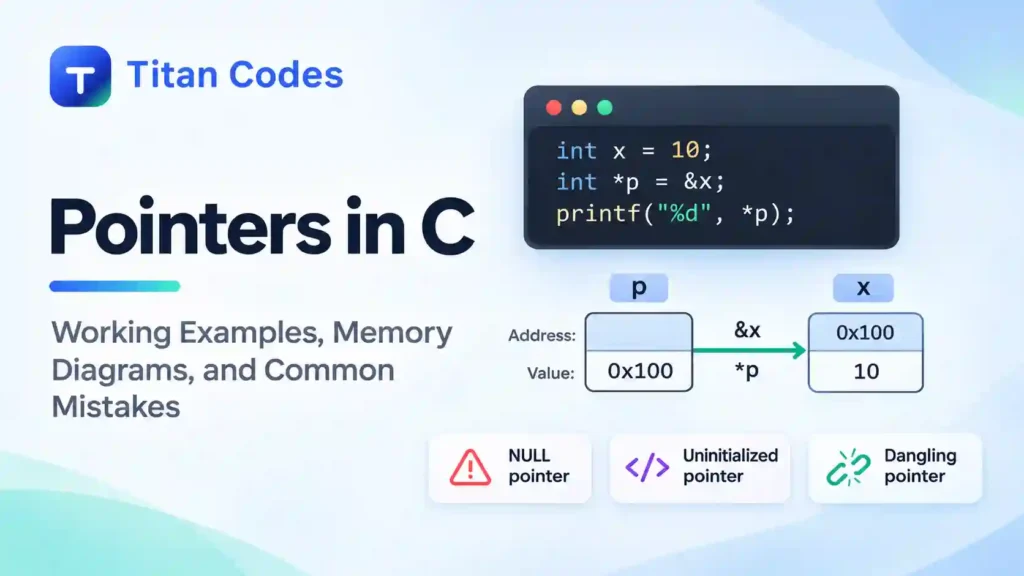
A pointer in C lets you access a variable through its memory address. Instead of working only with a variable’s name, you can store its address and use that address to read or modify the value.
The tricky part is understanding the difference between ptr, *ptr, and &ptr. They look similar but mean different things.
This guide explains pointers with working C programs, memory diagrams, arrays, functions, dynamic memory allocation, and common errors. If you are new to the language, start with our guide to what C is and how the language works.
What Is a Pointer in C?
A pointer in C is a variable that stores a memory address, allowing a program to access another object indirectly.
For example:
int age = 25;
int *ptr = &age;
Here:
- age stores the integer 25.
- &age produces the address of age.
- ptr stores that address.
- *ptr accesses the integer stored at that address.
The C pointer declaration reference explains how pointers are declared and used to refer to objects and functions.
How Does a Pointer Look in Memory?
Imagine that the integer age is stored at memory address 0x1000, while the pointer variable itself is stored at 0x2000.
Memory Diagram 1: A pointer referencing a variable
Memory Address Variable Stored Value
————————————————
0x1000 age 25
↑
|
0x2000 ptr 0x1000
The pointer contains an address, not a copy of the original integer.
The addresses in this diagram are illustrative. Actual memory addresses vary between systems and program executions.
How Do You Declare and Initialize a Pointer in C?
A pointer declaration specifies the type of object it is intended to reference.
1. Basic Pointer Declaration
int *ptr;
This declares ptr as a pointer to an integer.
It does not initialize the pointer. You must assign it a valid pointer value before dereferencing it.
A safer starting declaration when no object is available is:
int *ptr = NULL;
NULL represents a null pointer constant. A null pointer does not point to an object.
2. Initialize a Pointer With a Variable’s Address
int number = 50;
int *ptr = &number;
Now ptr points to number.
The types need to be compatible. An int * is intended to point to an int, while a double * points to a double.
3. Declaring Multiple Pointers
This declaration often confuses beginners:
int *a, b;
Only a is a pointer.
b is an ordinary integer.
To declare two pointers, write:
int *a = NULL, *b = NULL;
The * belongs to each pointer declarator, not automatically to every variable in the statement.
4. How to Print a Pointer Address
Use %p with a void * argument:
printf(“%p\n”, (void *)ptr);
The output might resemble:
0x7ffd12345678
The actual address and its formatting are implementation-dependent.
What Do & and * Mean in C?
These are the two most important operators to understand when learning pointers.
| Expression | Meaning |
| age | Value stored in age |
| &age | Address of age |
| ptr | Address stored in the pointer |
| *ptr | Value found by dereferencing ptr |
| &ptr | Address of the pointer variable itself |
What Does the Address-of Operator & Do?
The address-of operator produces the address of an object.
int age = 25;
int *ptr = &age;
Here, &age produces a pointer to age, and that pointer value is stored in ptr.
What Does the Dereference Operator * Do?
Dereferencing accesses the object a pointer refers to.
Let’s use a complete example.
#include <stdio.h>
int main(void) {
int age = 25;
int *ptr = &age;
printf(“age = %d\n”, age);
printf(“*ptr = %d\n”, *ptr);
*ptr = 40;
printf(“age after change = %d\n”, age);
return 0;
}
Output:
age = 25
*ptr = 25
age after change = 40
Notice what happened:
*ptr = 40;
This statement changed age itself.
It did not create a second integer.
Memory Diagram 2: Updating a value through a pointer
BEFORE
age at 0x1000
+———-+
| 25 | <—– ptr
+———-+
Operation: *ptr = 40;
AFTER
age at 0x1000
+———-+
| 40 | <—– ptr
+———-+
The pointer still refers to the same object. Only the object’s value changed.
GNU’s pointer dereferencing documentation explains why assigning through *ptr can modify the referenced object.
How Do Pointers and Arrays Work Together?
Arrays and pointers are closely related in C, but they are not identical.
Consider:
int numbers[] = {10, 20, 30};
int *ptr = numbers;
In this expression, numbers converts to a pointer to its first element.
So:
ptr == &numbers[0]
is true.
1. Accessing Array Elements With Pointers
These two expressions access the same element:
numbers[1]
and:
*(numbers + 1)
Both refer to the second element, which contains 20.
The GNU C manual on pointers and arrays explains how array indexing is defined using pointer addition and dereferencing.
2. How Does Pointer Arithmetic Work?
Pointer arithmetic moves between elements of the pointed-to type.
For example:
#include <stdio.h>
int main(void) {
int numbers[] = {10, 20, 30};
int *ptr = numbers;
printf(“%d\n”, *ptr);
ptr++;
printf(“%d\n”, *ptr);
printf(“%d\n”, *(ptr + 1));
return 0;
}
Output:
10
20
30
When ptr++ executes, the pointer moves from the first element to the second.
It advances by one int element, not necessarily one byte.
Memory Diagram 3: Pointer arithmetic in an array
Assume sizeof(int) = 4 bytes
Address Element Value
————————————
0x1000 numbers[0] 10
0x1004 numbers[1] 20
0x1008 numbers[2] 30
ptr
|
v
[10] ——– [20] ——– [30]
^
|
ptr + 1
If ptr initially points to numbers[0], then ptr + 1 points to numbers[1].
The address difference is four bytes in this illustration because we assumed a four-byte int. Actual type sizes depend on the implementation.
3. What Happens at the End of an Array?
C allows a pointer to point one element past the end of an array.
For example:
int numbers[3] = {10, 20, 30};
int *end = numbers + 3;
Creating end is valid.
Dereferencing it is not:
// Invalid: do not dereference this pointer
// printf(“%d\n”, *end);
There is no fourth element to read.
Pointer arithmetic must respect the boundaries of the relevant array object. The GNU pointer arithmetic reference describes these restrictions.
4. Why Aren’t Arrays and Pointers the Same?
An array contains its elements.
A pointer is a separate object that stores a pointer value.
Consider:
int numbers[3] = {10, 20, 30};
int *ptr = numbers;
Here:
sizeof(numbers)
returns the total size of the array in bytes.
But:
sizeof(ptr)
returns the size of the pointer object itself.
They are not interchangeable.
This distinction matters when calculating array lengths, passing arrays to functions, and allocating memory.
How Do You Pass Pointers to Functions in C?
C passes function arguments by value.
However, a function can receive a copy of a pointer and use it to modify the object that the pointer references.
That is why pointers are useful when a function needs to update a variable belonging to its caller.
Example: Swapping Two Numbers Using Pointers
#include <stdio.h>
void swap(int *a, int *b) {
int temp = *a;
*a = *b;
*b = temp;
}
int main(void) {
int x = 10;
int y = 20;
swap(&x, &y);
printf(“x = %d, y = %d\n”, x, y);
return 0;
}
Output:
x = 20, y = 10
The function receives the addresses of x and y.
Inside swap(), dereferencing those pointers allows the function to change the original integers.
Memory Diagram 4: Before and after swapping
BEFORE swap()
x y
+——-+ +——-+
| 10 | | 20 |
+——-+ +——-+
^ ^
| |
a b
AFTER swap()
x y
+——-+ +——-+
| 20 | | 10 |
+——-+ +——-+
^ ^
| |
a b
Pointers make this possible without returning both numbers as separate results.
How Does Dynamic Memory Allocation Work With Pointers?
Sometimes the amount of memory a program needs is not known until runtime.
C provides functions such as malloc(), calloc(), realloc(), and free() to manage dynamically allocated memory.
1. What Does malloc() Return?
malloc() requests a block of memory and returns a pointer to the allocated storage if the request succeeds.
Here is a complete example:
#include <stdio.h>
#include <stdlib.h>
int main(void) {
int *numbers = malloc(3 * sizeof *numbers);
if (numbers == NULL) {
fprintf(stderr, “Allocation failed\n”);
return 1;
}
for (int i = 0; i < 3; i++) {
numbers[i] = (i + 1) * 10;
}
printf(“%d %d %d\n”,
numbers[0], numbers[1], numbers[2]);
free(numbers);
numbers = NULL;
return 0;
}
Output when allocation succeeds:
10 20 30
The program allocates enough space for three integers, checks the allocation, stores values, prints them, and releases the memory.
2. Why Check for NULL?
Memory allocation can fail.
When malloc() cannot allocate the requested memory, it returns a null pointer.
That is why the example checks:
if (numbers == NULL)
before accessing the allocated storage.
3. What Does free() Do?
free() releases dynamically allocated storage obtained from a compatible allocation function.
After freeing an allocation, the program must not access that object through its old pointers.
Memory Diagram 5: Allocation and release
AFTER malloc()
numbers
|
v
+——+——+——+
| 10 | 20 | 30 |
+——+——+——+
Dynamically allocated storage
AFTER free(numbers)
numbers
|
X Allocation no longer exists
|
[invalid to access]
AFTER numbers = NULL
numbers
|
v
NULL
Setting numbers to NULL makes that particular pointer variable easier to handle safely after the release.
It does not automatically change other pointers that may still refer to the freed allocation.
4. What Is a Dangling Pointer?
A dangling pointer refers to an object whose lifetime has ended or to storage that is no longer valid for access.
For example, if dynamically allocated memory is released, using a pointer to access that freed memory is invalid.
This can cause a use-after-free bug, one of the serious memory-safety problems in C.
What Are the Different Types of Pointers in C?
C supports several useful pointer forms.
| Pointer Form | Example | Meaning |
| Integer pointer | int *p | Pointer to an integer |
| Character pointer | char *p | Pointer to a character |
| Void pointer | void *p | Generic object pointer |
| Null pointer | int *p = NULL | Points to no object |
| Pointer to pointer | int **p | Pointer to another pointer |
| Pointer to const | const int *p | Cannot modify the integer through p |
| Const pointer | int *const p = &x | Pointer cannot be reassigned |
What Is a Void Pointer?
A void * can hold a pointer to an object without specifying the object’s type.
It is useful in generic interfaces, including memory allocation and callbacks.
A void * must be converted to an appropriate object pointer type before accessing a value through it.
What Is a Pointer to a Pointer?
A double pointer stores the address of another pointer.
int value = 10;
int *ptr = &value;
int **pptr = &ptr;
Here:
- ptr points to value.
- pptr points to ptr.
- **pptr accesses value.
Double pointers are useful when a function needs to modify a pointer variable, or when working with certain dynamically allocated data structures.
Function pointers are another important category. They let programs store references to functions and invoke them indirectly, which is useful for callbacks and generic APIs.
Common Pointer Mistakes in C and How to Fix Them
Many C pointer bugs come from accessing memory that is not valid for the operation being performed.
1. Dereferencing an Uninitialized Pointer
Incorrect:
int *ptr;
*ptr = 10;
ptr has not been initialized with a valid address.
Correct:
int value = 0;
int *ptr = &value;
*ptr = 10;
Now the pointer refers to a valid integer object.
2. Dereferencing a Null Pointer
Incorrect:
int *ptr = NULL;
// Invalid: undefined behavior
// printf(“%d\n”, *ptr);
A null pointer does not refer to an object.
Correct:
if (ptr != NULL) {
printf(“%d\n”, *ptr);
}
The check protects against null-pointer dereferencing, but a non-null pointer must still refer to a valid object before it is used.
3. Returning the Address of a Local Variable
Incorrect:
int *get_number(void) {
int value = 10;
return &value;
}
The local variable’s lifetime ends when the function returns.
A caller cannot safely dereference the returned pointer.
Better approach:
int get_number(void) {
return 10;
}
Return the value directly when a pointer is unnecessary.
4. Using Memory After free()
Incorrect:
int *ptr = malloc(sizeof *ptr);
if (ptr != NULL) {
*ptr = 10;
free(ptr);
// Invalid: object was already freed
// printf(“%d\n”, *ptr);
}
Once the allocation is freed, it must not be accessed again through that pointer.
Correct approach:
Use the object before releasing its storage.
int *ptr = malloc(sizeof *ptr);
if (ptr != NULL) {
*ptr = 10;
printf(“%d\n”, *ptr);
free(ptr);
ptr = NULL;
}
5. Accessing Outside Array Bounds
Incorrect:
int numbers[3] = {10, 20, 30};
// Invalid: no element at index 3
// printf(“%d\n”, numbers[3]);
Valid indices are 0, 1, and 2.
Accessing beyond those boundaries is undefined behavior.
Correct:
for (size_t i = 0;
i < sizeof numbers / sizeof numbers[0];
i++) {
printf(“%d\n”, numbers[i]);
}
This loop stays within the array’s bounds.
6. Forgetting to Release Allocated Memory
Incorrect:
void process(void) {
int *ptr = malloc(100 * sizeof *ptr);
if (ptr == NULL) {
return;
}
/* Use allocated memory */
// Missing free(ptr)
}
When the function returns, the allocated storage remains allocated without a retained pointer to release it.
Correct:
Release the allocation when it is no longer needed.
free(ptr);
7. Confusing an Address With the Value at That Address
These are not equivalent:
ptr
and:
*ptr
The first expression gives the pointer value.
The second accesses the referenced object.
For printing a pointer address, use:
printf(“%p\n”, (void *)ptr);
For printing a referenced integer, use:
printf(“%d\n”, *ptr);
The pointer must be valid to dereference.
Quick Reference: Common Pointer Errors
| Mistake | Risk | Safer Approach |
| Uninitialized pointer | Invalid access | Initialize before use |
| Null dereference | Undefined behavior | Check pointer and object validity |
| Out-of-bounds pointer | Invalid memory access | Respect array bounds |
| Use after free | Memory corruption or crashes | End access before releasing storage |
| Returning local address | Dangling pointer | Return a value or use suitable storage |
| Missing free() | Memory leak | Define ownership and cleanup |
| Wrong format specifier | Undefined behavior | Use matching format and argument types |
Many of these mistakes involve undefined behavior in C, meaning the C standard does not define what the program must do.
A program might crash, appear to work, or behave differently after compilation with different optimization settings. None of those outcomes is guaranteed.
How Do You Debug Pointer Errors in C?
Compiler warnings and runtime sanitizers can help identify pointer mistakes.
1. Enable Compiler Warnings
With GCC or Clang:
gcc -std=c17 -Wall -Wextra -Wpedantic -g example.c -o example
These options enable useful warnings and retain debugging information.
Compiler warnings do not detect every memory problem, but they are a sensible starting point.
2. Use AddressSanitizer
AddressSanitizer is a runtime diagnostic tool that can detect many invalid memory operations.
With Clang:
clang -std=c17 -Wall -Wextra \
-g -fsanitize=address \
example.c -o example
Then run:
./example
The official Clang AddressSanitizer documentation explains how it detects problems such as heap use-after-free and out-of-bounds memory access.
AddressSanitizer cannot prove that a program is free of memory errors, but it is extremely useful during testing.
3. Check Pointer Lifetimes and Ownership
When debugging, ask:
- What object does this pointer refer to?
- Has the object been initialized?
- Is that object still alive?
- Is the pointer within valid bounds?
- Who is responsible for releasing allocated storage?
- Could another part of the program have freed it?
These questions often reveal the real cause faster than repeatedly changing code without understanding the memory state.
When Should You Use Pointers in C?
Pointers are useful when a program needs to:
- Modify an object through a function
- Traverse arrays and other data structures
- Work with dynamically allocated memory
- Pass large structures without copying their contents
- Build linked lists, trees, or other linked structures
- Interact with low-level APIs
- Work with buffers or hardware
- Implement callbacks using function pointers
Not every variable needs a pointer.
If a function only needs a small value and does not need to modify the caller’s object, passing that value directly is often simpler.
Use pointers when indirect access serves a clear purpose.
How Titan Codes Approaches Memory-Safe Software Development
At Titan Codes, programming-language and architecture decisions depend on the requirements of the system being built.
C offers valuable control in systems programming, native integrations, and performance-sensitive components. That control also requires disciplined memory management, testing, and careful handling of object lifetimes.
For higher-level business applications, the right choice may be a different language or framework that provides safer abstractions and faster development.
This requirement-driven approach is part of Titan Codes Custom Software Development, where development decisions are guided by the software’s purpose, integrations, reliability, security, and long-term maintenance needs.
Frequently Asked Questions About Pointers in C
What Is a Pointer in C With an Example?
A pointer is a variable that stores an address. For example, int x = 10; int *p = &x; declares an integer and a pointer that refers to it. Accessing *p reads the value 10, while assigning to *p can modify x.
What Is the Difference Between & and * in C?
In pointer-related expressions, & produces an object’s address, while unary * dereferences a pointer to access the referenced object. For example, &x produces a pointer to x, and *p accesses the object that p points to.
What Is the Difference Between an Array and a Pointer in C?
An array contains a fixed sequence of elements, while a pointer stores a pointer value. Array expressions often convert to pointers to their first elements, but arrays and pointers are not the same type of object. Their sizeof behavior, declarations, and storage are different.
What Happens When a Pointer Is Incremented?
When a pointer to an array element is incremented, it advances by one element of its pointed-to type. For an int *, this means moving by the size of an int. The resulting pointer must remain within the permitted bounds of the same array, including the one-past-the-end position.
Can a Null Pointer Be Dereferenced in C?
No. Dereferencing a null pointer causes undefined behavior. A program should check whether a pointer is null before attempting to use it, and must also ensure that a non-null pointer refers to a valid object whose lifetime has not ended.
Final Thoughts
Pointers in C become much easier once you separate three ideas: the pointer variable, the address it stores, and the object that address refers to.
The most important operations are straightforward:
- &x obtains the address of x.
- p stores a pointer value.
- *p accesses the referenced object.
- p + 1 moves to the next element when used within valid array bounds.
The difficult part is ensuring that the memory being accessed is still valid.
Practice with small programs, check the output, visualize the memory, and use compiler warnings and sanitizers to catch mistakes. Those habits matter more than memorizing pointer syntax alone.