
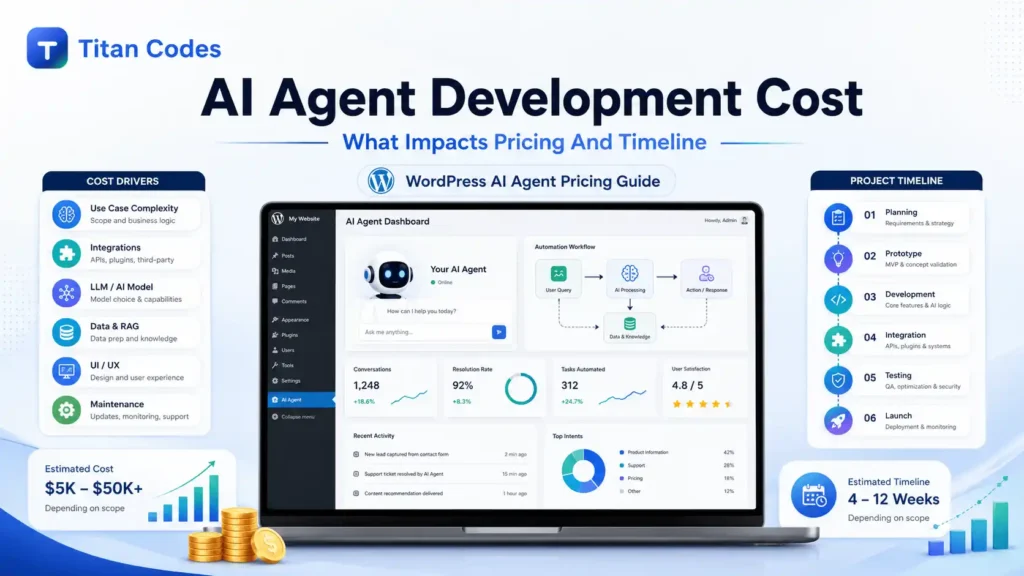
Most businesses do not struggle with the idea of building an AI agent. They struggle with a more practical question: how much will it cost, and how long will it take?
The answer depends on what the AI agent needs to do. A simple FAQ agent that answers customer questions is very different from an enterprise AI agent that connects with CRM, ERP, HR tools, internal databases, and approval workflows. Both are called AI agents, but the cost, timeline, architecture, and risk level are completely different.
In 2026, AI agent development cost can range from $5,000 to $500,000+, depending on complexity, autonomy, integrations, data quality, security needs, and deployment scale. A basic prototype may take a few weeks, while a secure enterprise-grade multi-agent system can take several months.
This guide breaks down what impacts AI agent pricing and timeline so you can plan your budget clearly before investing.
Quick Answer: How Much Does AI Agent Development Cost?
AI agent development usually costs between $5,000 and $500,000+ in 2026. The final cost depends on the agent type, number of workflows, AI model, integrations, data preparation, compliance needs, and long-term maintenance.
| AI Agent Type | Estimated Cost | Timeline | Best For |
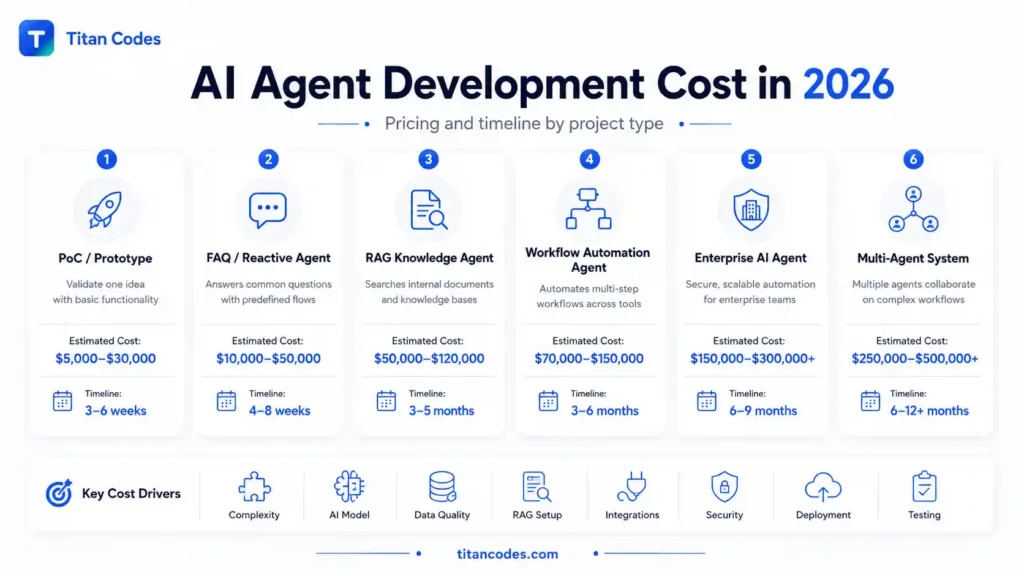
| PoC or Prototype | $5,000 to $30,000 | 3 to 6 weeks | Validating one use case |
| FAQ or Reactive Agent | $10,000 to $50,000 | 4 to 8 weeks | Customer support and simple queries |
| RAG Knowledge Agent | $50,000 to $120,000 | 3 to 5 months | Searching company documents and knowledge bases |
| Workflow Automation Agent | $70,000 to $150,000 | 3 to 6 months | CRM, ERP, HR, sales, and support automation |
| Enterprise AI Agent | $150,000 to $300,000+ | 6 to 9 months | Secure business automation at scale |
| Multi-Agent System | $250,000 to $500,000+ | 6 to 12+ months | Complex enterprise workflows |
The biggest mistake is assuming that AI agent cost is only about the AI model. In real projects, most of the budget goes into workflow planning, data preparation, integrations, security, testing, deployment, monitoring, and maintenance.
What Is an AI Agent?
An AI agent is a software system that can understand instructions, process information, make decisions within defined rules, and take action using approved tools or systems.
A basic chatbot may only answer questions. An AI agent can go further. It can retrieve information, summarize data, update a CRM, create a support ticket, prepare an email draft, route a lead, generate a report, or trigger a workflow after checking conditions.
For example, an AI sales agent can qualify a lead, check CRM history, prepare a follow-up email, assign the lead to the right sales rep, and log the interaction. A customer support AI agent can answer common questions, search internal knowledge, escalate complex issues, and create tickets with summaries.
If you are planning this type of tool-connected workflow, Titan Codes AI Agent Development Services can help you scope, design, and build AI agents with clear workflows, permissions, guardrails, testing, and launch control.
AI Agent Development Cost by Project Type
The cost of building an AI agent depends heavily on the project type. Some businesses only need a small prototype to validate an idea. Others need production-ready systems that connect with multiple tools and support thousands of users.
1. PoC or Prototype
A Proof of Concept is the smallest version of an AI agent. It is built to test one idea before committing to a bigger build.
A PoC usually includes a limited workflow, basic prompts, simple UI, and one controlled use case. It may not include advanced security, multiple integrations, or production-grade infrastructure.
Estimated cost: $5,000 to $30,000
Estimated timeline: 3 to 6 weeks
Best for: Startups and businesses testing whether an AI agent can solve a specific problem
A PoC is useful when you are not fully sure about ROI. It gives you something practical to test with users before scaling the investment.
2. FAQ or Reactive AI Agent
A reactive AI agent handles common questions and predefined conversations. It can answer FAQs, route inquiries, collect lead details, and provide basic customer support.
This is usually cheaper because the logic is limited. The agent does not need deep reasoning, complex memory, or many system integrations.
Estimated cost: $10,000 to $50,000
Estimated timeline: 4 to 8 weeks
Best for: Website support, lead qualification, customer FAQs, and basic service inquiries
This type of agent is a good first step for companies that want faster response times without building a complex automation system.
3. RAG Knowledge Agent
A RAG knowledge agent uses Retrieval-Augmented Generation to answer questions from approved business documents, policies, PDFs, product data, or internal knowledge bases.
This costs more than a basic chatbot because the project needs document processing, embeddings, vector database setup, retrieval testing, and response validation.
Estimated cost: $50,000 to $120,000
Estimated timeline: 3 to 5 months
Best for: Internal knowledge search, policy assistants, legal document search, product support, and employee helpdesks
RAG is useful when accuracy depends on your company’s own data. Instead of giving generic answers, the agent retrieves relevant information from approved sources before responding.
Titan Codes also offers RAG Knowledge Base AI for businesses that need AI answers grounded in internal documents, FAQs, policies, service data, and approved knowledge sources.
4. Workflow Automation Agent
A workflow automation agent does more than answer questions. It connects with business tools and completes multi-step tasks.
For example, it can update CRM records, create tasks, summarize customer requests, send notifications, prepare reports, or move data between platforms.
Estimated cost: $70,000 to $150,000
Estimated timeline: 3 to 6 months
Best for: Sales automation, support operations, HR workflows, finance tasks, CRM updates, and reporting
The cost is higher because every workflow needs clear triggers, tool permissions, fallback rules, human review points, and testing. If the agent is allowed to take business actions, the architecture must be controlled carefully.
For businesses that want controlled workflow automation, Titan Codes AI Automation Services can help map repetitive tasks, connect tools, add human review, and build measurable automation workflows.
5. Enterprise AI Agent
An enterprise AI agent is built for serious business use. It usually includes multiple integrations, role-based access, audit logs, security controls, dashboards, compliance review, and scalable infrastructure.
Estimated cost: $150,000 to $300,000+
Estimated timeline: 6 to 9 months
Best for: Large teams, regulated industries, internal operations, and high-volume automation
Enterprise AI agents cost more because reliability matters. A demo can fail quietly, but an enterprise system needs to work safely across real users, real data, and real workflows.
6. Multi-Agent System
A multi-agent system includes multiple specialized AI agents working together. One agent may gather information, another may analyze it, another may check policy, and another may prepare the final action for approval.
Estimated cost: $250,000 to $500,000+
Estimated timeline: 6 to 12+ months
Best for: Complex enterprise operations, supply chain workflows, advanced research systems, finance automation, and large-scale business process automation
This is the most expensive category because it requires orchestration, planning logic, memory, permissions, monitoring, fail-safe controls, and advanced testing.
What Impacts AI Agent Pricing?
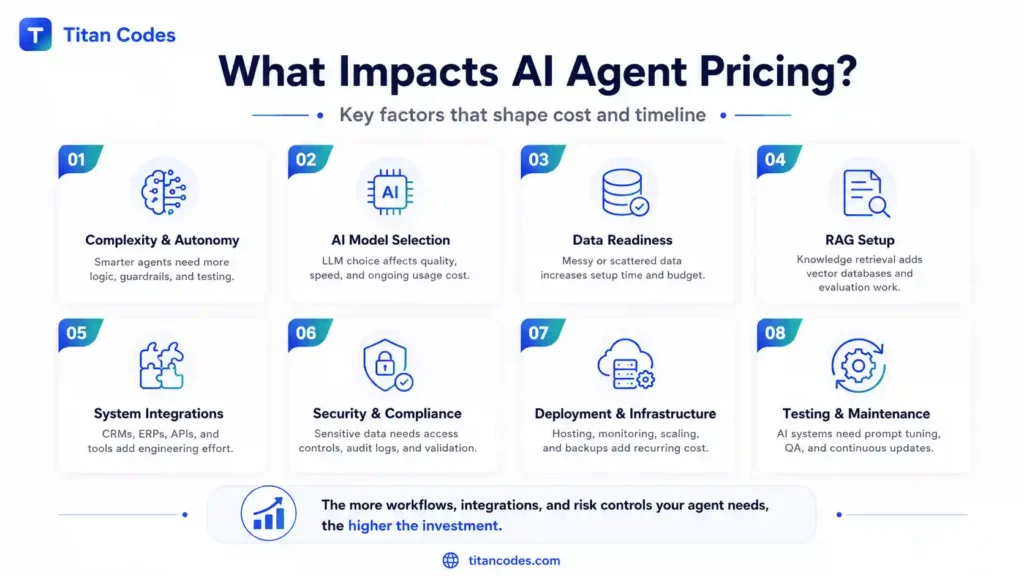
AI agent pricing changes because every project has a different level of intelligence, autonomy, risk, and system dependency. Here are the most important cost drivers.
1. Complexity and Autonomy Level
The more independent the AI agent is, the more it costs.
A simple agent responds to user input. A more advanced agent can understand context, use tools, make decisions, and complete tasks. An autonomous agent may plan steps, call APIs, check results, retry failed actions, and escalate risky decisions to humans.
| Autonomy Level | Example | Cost Impact |
| Low autonomy | FAQ agent with fixed flows | Lower |
| Medium autonomy | Support agent with memory and CRM lookup | Medium |
| High autonomy | Workflow agent that takes approved actions | High |
| Advanced autonomy | Multi-agent system with planning and orchestration | Very high |
More autonomy means more engineering. You need guardrails, testing, logs, permissions, fallback paths, and human-in-the-loop controls.
2. Number of Use Cases and Workflows
One focused use case is easier to build than five loosely defined workflows.
For example, an AI agent that answers product FAQs is simple. But if the same agent also qualifies leads, updates CRM records, books meetings, sends follow-ups, creates support tickets, and prepares reports, the scope becomes much larger.
Each workflow adds:
- Business logic
- User roles
- API connections
- Permissions
- Error handling
- Testing scenarios
- Maintenance requirements
The best approach is to start with one high-impact workflow, prove value, then expand.
3. AI Model Selection
The AI model you choose affects both development cost and operating cost.
Some agents use API-based models such as OpenAI, Claude, or Gemini. These are faster to implement but usually come with ongoing usage costs based on tokens, requests, or model usage. You can review model usage structure through the official OpenAI API pricing page.
Other agents use open-source models such as Llama. These may reduce external API dependency but can require more setup, hosting, DevOps work, GPU infrastructure, and optimization.
The cheapest model is not always the cheapest solution. A weaker model may require more prompt engineering, more testing, more retries, and more human review. A stronger model may cost more per request but reduce failure rates and development complexity.
4. Data Quality and RAG Setup
AI agents are only as useful as the information behind them.
If your data is clean, structured, and easy to access, development becomes faster. If your data is scattered across PDFs, spreadsheets, CRMs, emails, helpdesk tools, and old documents, the project takes longer.
For RAG agents, the development team may need to:
- Clean and organize documents
- Remove outdated information
- Break content into useful chunks
- Create embeddings
- Set up a vector database
- Test retrieval accuracy
- Add source references
- Prevent irrelevant answers
This is why RAG-based AI agents cost more than simple chatbots. They need a reliable knowledge layer, not just a prompt.
5. Third-Party Integrations
Integrations are one of the biggest cost drivers in AI agent development.
An AI agent may need to connect with:
- CRM platforms
- ERP systems
- HRMS tools
- Slack or Microsoft Teams
- Payment systems
- Helpdesk tools
- Internal databases
- Email platforms
- Analytics tools
- Project management tools
Every integration requires API setup, authentication, permission handling, error handling, logging, and testing.
For example, connecting an agent to a CRM is not only about sending data. The system must know what fields to update, which user has permission, what happens if the API fails, and when a human should approve the action.
That is why tool-connected agents cost more than basic conversation agents.
6. Security and Compliance Requirements
Security can significantly increase AI agent development cost, especially in industries like healthcare, finance, insurance, legal, and enterprise SaaS.
A secure AI agent may need:
- Data encryption
- Role-based access control
- Audit logs
- User permission management
- Secure API handling
- Human approval workflows
- Compliance documentation
- Data retention policies
- Red-teaming and risk testing
If the system handles sensitive data, compliance cannot be added later as an afterthought. It should be built into the architecture from the start.
For AI risk planning, businesses can refer to frameworks such as the NIST AI Risk Management Framework. Companies working in or selling to the EU should also consider the EU AI Act, especially where AI systems may fall into higher-risk categories.
7. Deployment and Infrastructure
AI agent deployment includes more than launching code on a server.
A production AI agent may require:
- Cloud hosting
- API gateway setup
- Vector database hosting
- Logging and monitoring
- Backup systems
- Autoscaling
- Secure environments
- Cost tracking
- Performance optimization
- Monitoring dashboards
Infrastructure costs increase with usage. A small internal tool may cost a few hundred dollars per month. A high-volume customer-facing agent may require thousands of dollars per month in hosting, API usage, observability, and support.
For AI systems that need reliable hosting, monitoring, backups, and scale planning, Titan Codes provides Cloud Services for digital products and AI-powered systems.
8. Testing and Evaluation
AI agents need a different testing approach than normal software.
Traditional software testing checks whether buttons, APIs, and pages work correctly. AI agent testing also checks whether the agent understands context, follows instructions, avoids unsafe actions, and handles edge cases properly.
Testing may include:
- Prompt testing
- Hallucination testing
- Workflow testing
- API failure testing
- Security testing
- Role permission testing
- Human approval testing
- Red-team testing
- Regression testing after model updates
Skipping this stage can make the project look cheaper at first, but it creates higher risk after launch.
AI Agent Development Timeline: How Long Does It Take?
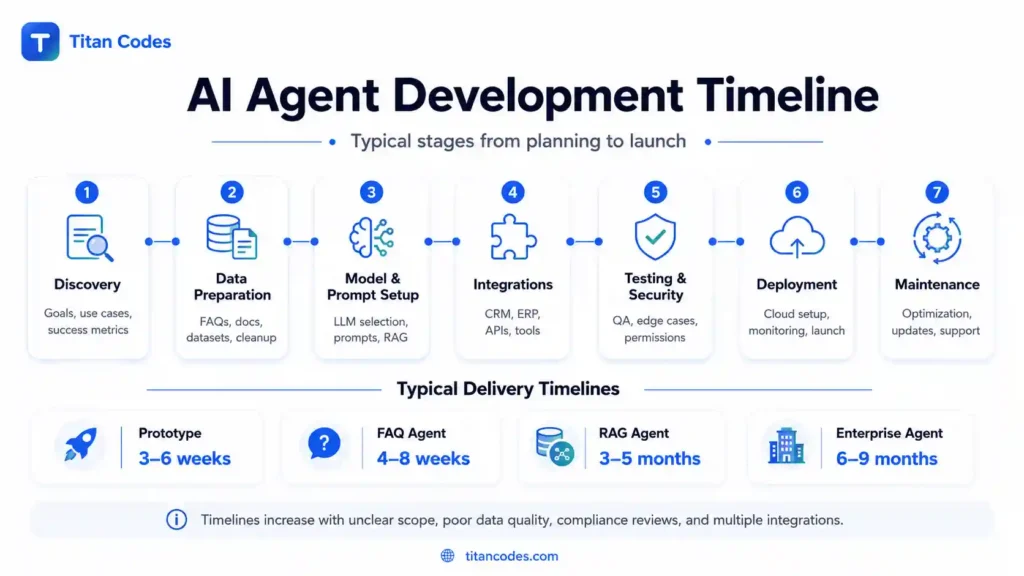
AI agent development can take anywhere from 3 weeks to 12+ months, depending on complexity, integrations, data readiness, and compliance requirements.
| Project Type | Timeline |
| Basic prototype | 3 to 6 weeks |
| FAQ chatbot-style agent | 4 to 8 weeks |
| RAG knowledge assistant | 3 to 5 months |
| Workflow automation agent | 3 to 6 months |
| Enterprise AI agent | 6 to 9 months |
| Multi-agent system | 6 to 12+ months |
What Can Delay an AI Agent Project?
Timelines usually increase because of unclear requirements, messy data, or changing scope.
Common reasons for delay include:
- The use case is not clearly defined
- Business workflows are not documented
- Internal data is outdated or unstructured
- API access is delayed
- Too many integrations are added in phase one
- Compliance approval takes longer than expected
- Stakeholders keep changing requirements
- Testing reveals edge cases that need new controls
- The selected AI model does not perform well enough
A clear discovery phase can prevent many of these delays. Before development starts, the team should define users, workflows, data sources, tools, risks, approval rules, success metrics, and launch priorities.
AI Agent Development Cost Breakdown by Phase
A good AI agent budget is not one single development number. It is spread across planning, data, development, integrations, testing, deployment, and maintenance.
| Development Phase | What Happens | Cost Impact |
| Discovery and Planning | Scope, use case, workflows, risks, success metrics | Low to medium |
| Data Preparation | Cleaning documents, databases, FAQs, CRM data | Medium to high |
| AI Model and Prompt Setup | LLM selection, prompt design, RAG setup, evaluation | Medium |
| Backend and Integrations | APIs, databases, business systems, permissions | High |
| UI or Dashboard | Admin panel, approval flow, reporting, user interface | Medium |
| Testing and Security | Edge cases, hallucination testing, compliance, red-teaming | Medium to high |
| Deployment | Cloud setup, monitoring, logging, scaling | Medium |
| Maintenance | Updates, prompt tuning, monitoring, retraining | Recurring |
In many real projects, integrations and testing take more budget than the AI model itself. That is normal because the agent must work safely inside your business environment.
AI Agent Cost vs AI Chatbot Cost
Many businesses confuse AI agents with AI chatbots, but they are not the same.
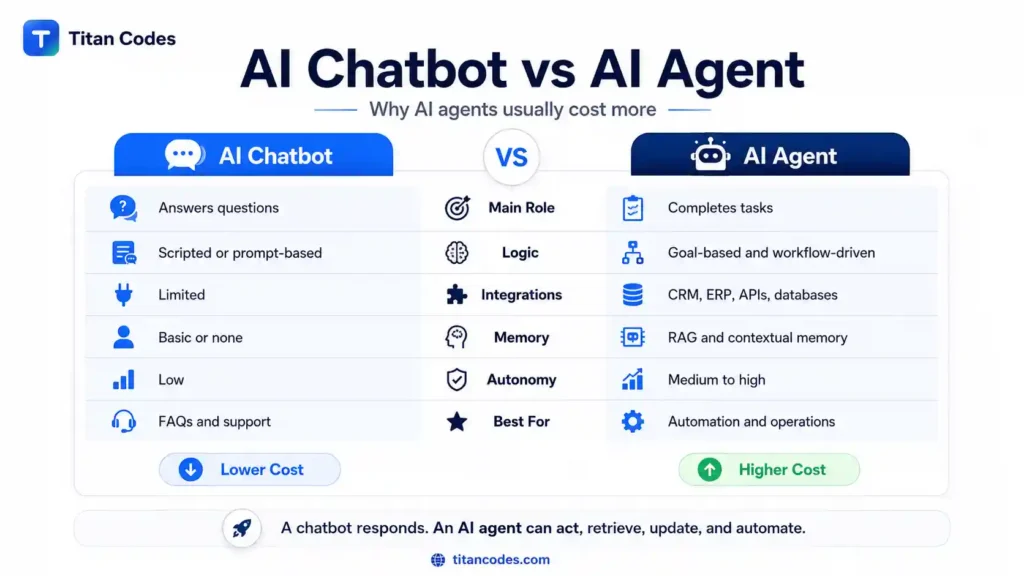
A chatbot mainly answers questions. An AI agent can complete tasks.
| Feature | AI Chatbot | AI Agent |
| Main role | Answers questions | Completes tasks |
| Logic | Scripted or prompt-based | Goal-based and workflow-driven |
| Integrations | Limited | CRM, ERP, APIs, databases |
| Memory | Basic or none | Can use RAG and contextual memory |
| Autonomy | Low | Medium to high |
| Cost | Lower | Higher |
| Best for | Customer support and FAQs | Operations, productivity, and workflow automation |
A simple chatbot is enough if your goal is to answer common customer questions. But if you want the system to update tools, retrieve internal knowledge, trigger workflows, prepare outputs, or support operations, you need an AI agent.
Titan Codes also provides AI Chatbot Development for businesses that need conversational support before moving into deeper agent-based automation.
Build vs Buy: Which Option Is Better?
Businesses usually have three options: buy a SaaS tool, use a low-code platform, or build a custom AI agent.
| Option | Cost | Best For | Limitation |
| SaaS AI tool | Low monthly cost | Simple tasks and quick setup | Limited customization |
| Low-code AI agent | Medium | Faster MVPs and internal experiments | Platform dependency |
| Custom AI agent | Higher upfront cost | Unique workflows and integrations | Longer timeline |
| Enterprise AI system | Highest | Complex automation and compliance | Needs strong planning |
Buying is better when your workflow is simple and the tool already does what you need.
Custom development is better when your AI agent must connect with internal systems, follow company-specific logic, handle sensitive data, support custom workflows, or scale across departments.
A custom AI agent costs more upfront, but it gives you more control over architecture, integrations, data handling, user permissions, and long-term scalability.
Hidden and Ongoing AI Agent Costs
The initial build cost is only part of the total investment. Once the AI agent is live, there are ongoing costs that businesses should plan for.
Common hidden costs include:
- LLM token or API usage
- Cloud hosting
- Vector database hosting
- Monitoring tools
- Logging and observability
- Bug fixing
- Prompt optimization
- Model updates
- Data refresh
- Security audits
- Compliance review
- Human review and approval
- User training
- Integration maintenance
A practical rule is to keep 15% to 25% of the initial development budget aside for annual maintenance, optimization, and support.
For example, if your AI agent costs $100,000 to build, you may need $15,000 to $25,000 per year for monitoring, improvements, bug fixes, model updates, and infrastructure changes.
Monthly Operating Cost of AI Agents
Operating costs depend on usage volume, model pricing, infrastructure, and support requirements.
| Usage Level | Estimated Monthly Cost | What It Usually Includes |
| Small internal use | $200 to $1,000 | API usage, basic hosting, light monitoring |
| Small customer-facing agent | $1,000 to $3,000 | Hosting, LLM usage, logs, support |
| Mid-size business agent | $3,000 to $10,000 | Integrations, monitoring, vector database, maintenance |
| Enterprise-scale agent | $10,000+ | High traffic, compliance, advanced monitoring, support |
These numbers can rise if the agent uses voice, image processing, complex reasoning loops, multiple languages, or heavy document retrieval.
How to Reduce AI Agent Development Cost
Reducing cost does not mean building a weak system. It means making better scope and architecture decisions.
Here are practical ways to control your budget.
1. Start with one high-impact use case
Do not try to automate everything in the first version. Start with one workflow where the value is clear.
For example, support ticket summarization, lead qualification, internal policy search, or CRM update automation can be strong starting points.
2. Build an MVP before full-scale automation
An MVP helps validate the workflow, user behavior, and ROI before you spend on enterprise-scale architecture.
3. Use existing foundation models first
Custom model training is expensive. In most cases, it is better to start with an existing model and focus on prompts, RAG, workflow design, and integrations.
4. Clean your data before development
Messy data increases both cost and timeline. Organize FAQs, documents, policies, product data, and CRM fields before development starts.
5. Limit integrations in phase one
Every integration adds cost. Start with the most important system first, then add more once the agent proves value.
6. Add human approval for high-risk actions
Human-in-the-loop workflows reduce risk and prevent the agent from taking sensitive actions without review.
7. Monitor token usage from day one
Poor prompts, long context windows, and unnecessary reasoning loops can increase API costs. Token usage should be tracked early.
8. Use modular architecture
A modular build allows you to add new workflows later without rebuilding the full system.
9. Avoid chasing unnecessary features
Voice, multimodal input, custom dashboards, advanced memory, and multi-agent orchestration are useful only when the business case supports them.
10. Work with a development team that understands AI delivery
AI agent development is not just prompt writing. It needs workflow mapping, backend development, data handling, integration, security, testing, deployment, and monitoring.
If you need a development partner, Titan Codes can help plan and build AI agents around real workflows, approved tools, knowledge quality, human review, and scalable architecture.
What Type of AI Agent Should Your Business Build?
The right AI agent depends on the business problem.
| Business Need | Recommended Agent | Why |
| Answer FAQs | FAQ or reactive agent | Low cost and fast launch |
| Search internal documents | RAG knowledge agent | More accurate answers from company data |
| Automate repetitive tasks | Workflow automation agent | Connects tools and executes actions |
| Support sales or HR teams | Contextual AI agent | Uses business data and user history |
| Automate complex operations | Multi-agent system | Multiple agents coordinate workflows |
| Maintain control over sensitive actions | Human-reviewed AI agent | Adds approval and audit trail |
If this is your first AI project, start small. A focused agent with one measurable use case is usually better than a large system with an unclear scope.
Common Budgeting Mistakes to Avoid
AI agent projects usually become expensive for predictable reasons. Avoid these mistakes before development starts.
- Starting with too many use cases
More use cases mean more logic, data, testing, and integrations. Start with one or two high-value workflows.
- Ignoring data quality
If your data is outdated, duplicated, or scattered, your AI agent will struggle to deliver accurate results.
- Choosing the most expensive model by default
A powerful model is not always necessary. The right model depends on the task, risk level, response quality, and operating budget.
- Not planning monthly operating costs
API usage, hosting, monitoring, and maintenance continue after launch. These should be part of the budget from day one.
- Skipping security and compliance
Security controls are cheaper to build early than to fix after launch.
- Treating AI agents like normal chatbots
Agents take action. That means they need stronger permissions, testing, logging, and fallback rules.
- Not testing failed workflows
You need to know what happens when the API fails, the data is missing, the agent is unsure, or the user asks for something outside the scope.
- Building full automation before proving ROI
Do not automate a workflow until you know it saves time, improves accuracy, reduces cost, or increases revenue.
When Should You Invest in AI Agent Development?
AI agent development makes sense when your business has repetitive workflows, high support volume, scattered knowledge, slow internal processes, or manual tasks that depend on multiple tools.
It may be a good fit if:
- Your team spends too much time answering the same questions
- Leads are not followed up on quickly
- Support tickets need manual classification and routing
- Employees struggle to find internal information
- CRM or reporting tasks are repetitive
- Customers need faster responses
- Operations depend on too many manual handoffs
- You want controlled automation with human approval
It may not be the right time if your data is not ready, your workflow is unclear, your team has no defined process, or the expected ROI is weak.
Why Choose Titan Codes for AI Agent Development?
Titan Codes builds AI agents for real business workflows, not vague demos. The focus is on clear scope, useful automation, approved knowledge, safe tool access, testing, logging, and human review where needed.
Titan Codes can help with:
- AI agent discovery and scope planning
- Workflow mapping
- RAG knowledge systems
- AI automation
- CRM and API integrations
- Tool-connected AI agents
- Human approval workflows
- Cloud deployment
- Monitoring and support
- Scalable architecture for future expansion
Whether you need a simple AI assistant, a RAG-based knowledge agent, or a workflow automation system, Titan Codes can help you estimate the right development cost and timeline before you invest.
You can explore AI Development Services to choose the right service path for your project.
Final Thoughts
AI agent development cost is not fixed because every project has a different level of complexity, autonomy, data dependency, security needs, and integration depth.
A basic AI agent may cost $10,000 to $50,000 and launch within weeks. A RAG knowledge agent may cost $50,000 to $120,000 and take a few months. A workflow automation agent or enterprise AI system can cost $150,000 to $500,000+ because it needs deeper integrations, stronger security, reliable testing, and ongoing governance.
The best way to control cost is to start with a clear business goal, build in phases, prepare your data, limit initial integrations, and plan for maintenance from the beginning.
AI agents can create real business value, but only when they are scoped properly. The goal is not to build the most advanced agent possible. The goal is to build the right agent for the workflow, budget, timeline, and risk level of your business.
FAQs
-
How much does it cost to build an AI agent in 2026?
AI agent development usually costs between $5,000 and $500,000+ in 2026. A simple prototype or FAQ agent may cost $5,000 to $50,000, while enterprise AI agents and multi-agent systems can cost $150,000 to $500,000+.
-
How long does it take to develop an AI agent?
A basic AI agent can take 3 to 8 weeks. A RAG knowledge agent or workflow automation agent may take 3 to 6 months. Enterprise AI agents and multi-agent systems can take 6 to 12+ months, depending on scope, integrations, and compliance needs.
-
What factors affect AI agent development cost?
The main factors include complexity, autonomy level, number of workflows, AI model selection, data quality, RAG setup, third-party integrations, security, compliance, deployment infrastructure, testing, and maintenance.
-
Is an AI agent more expensive than a chatbot?
Yes, an AI agent usually costs more than a chatbot because it can complete tasks, use tools, connect with systems, remember context, and automate workflows. A chatbot mainly answers questions, while an AI agent can act within approved boundaries.
-
What is the cost of a RAG-based AI agent?
A RAG-based AI agent usually costs between $50,000 and $120,000. The cost depends on the number of documents, data quality, vector database setup, retrieval accuracy, integrations, and testing requirements.
-
How can businesses reduce AI agent development cost?
Businesses can reduce cost by starting with one use case, building an MVP, using existing foundation models, preparing clean data, limiting phase-one integrations, monitoring API usage, and choosing a modular architecture.