
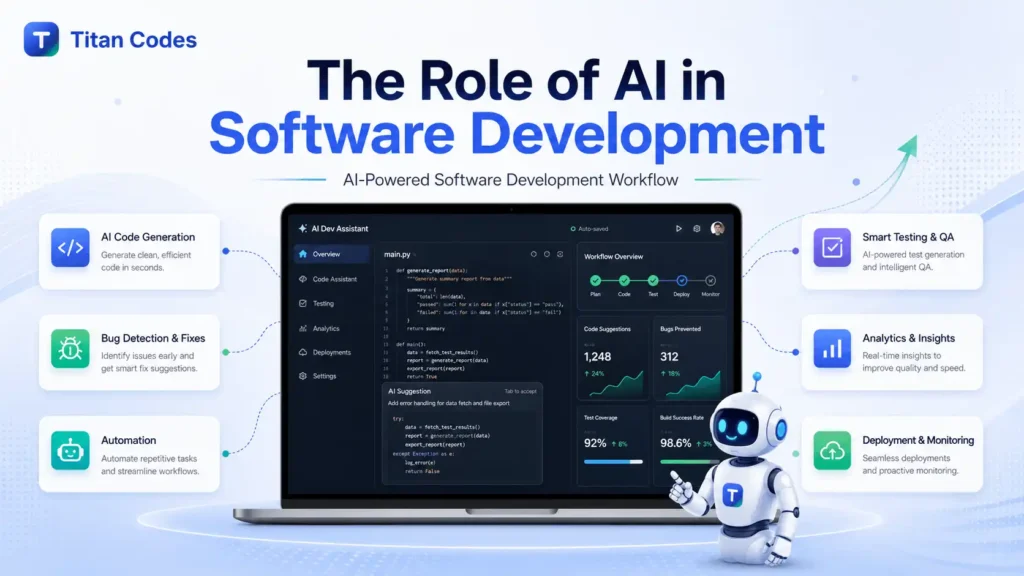
Artificial intelligence is no longer just a future trend in software development. It is already changing how teams plan, build, test, deploy, and maintain software.
For developers, AI can act like a coding assistant, documentation helper, testing partner, and debugging support system. For businesses, it can reduce repetitive work, speed up development cycles, improve product quality, and open new ways to automate internal workflows.
But AI is not a shortcut to good software. It does not remove the need for strong architecture, clean code, product thinking, security review, or human judgment. The real role of AI in software development is not to replace developers. It is to help skilled teams build better software faster, with more clarity and control.
In this article, we will explore how AI is used in software development, where it creates real value, what risks businesses should understand, and how developers can prepare for an AI-assisted future.
What Is AI in Software Development?
AI in software development means using artificial intelligence technologies to support different stages of the software development lifecycle. These technologies can help teams analyze requirements, generate code, detect bugs, automate testing, create documentation, monitor systems, and improve user experiences.
AI can support software development through:
- Generative AI for code generation, test cases, documentation, and prototypes
- Machine learning for predictions, anomaly detection, and optimization
- Natural language processing for requirement analysis, coding prompts, and chatbot-style developer assistance
- Computer vision for UI testing and visual quality checks
- AI agents for multi-step workflows such as researching, planning, writing, testing, and triggering approved actions
In simple terms, AI helps software teams convert ideas into working systems with less manual effort. However, the quality of the final product still depends on how well humans define the problem, review the output, and make technical decisions.
Why AI Matters in Modern Software Engineering
Software teams are under constant pressure to deliver faster without compromising quality. Businesses want products that are secure, scalable, user-friendly, and cost-efficient. Developers are expected to write clean code, fix bugs, maintain documentation, review pull requests, manage releases, and respond to production issues.
AI matters because it can reduce friction in many of these areas.
According to the Stack Overflow 2025 Developer Survey, 84% of respondents are using or planning to use AI tools in their development process. This shows that AI-assisted development is no longer experimental for many teams. It is becoming part of everyday engineering workflows.
A controlled study on GitHub Copilot also found that developers using the tool completed a specific coding task 55.8% faster than those without it. However, this does not mean every software project becomes 55% faster. Real software development includes planning, architecture, QA, deployment, communication, maintenance, and user feedback, not just writing code. You can read the study here: The Impact of AI on Developer Productivity.
That is why businesses should think of AI as a lifecycle accelerator, not just a code generator.
How AI Supports the Software Development Lifecycle
AI can support almost every stage of the software development lifecycle, from early planning to post-launch maintenance.
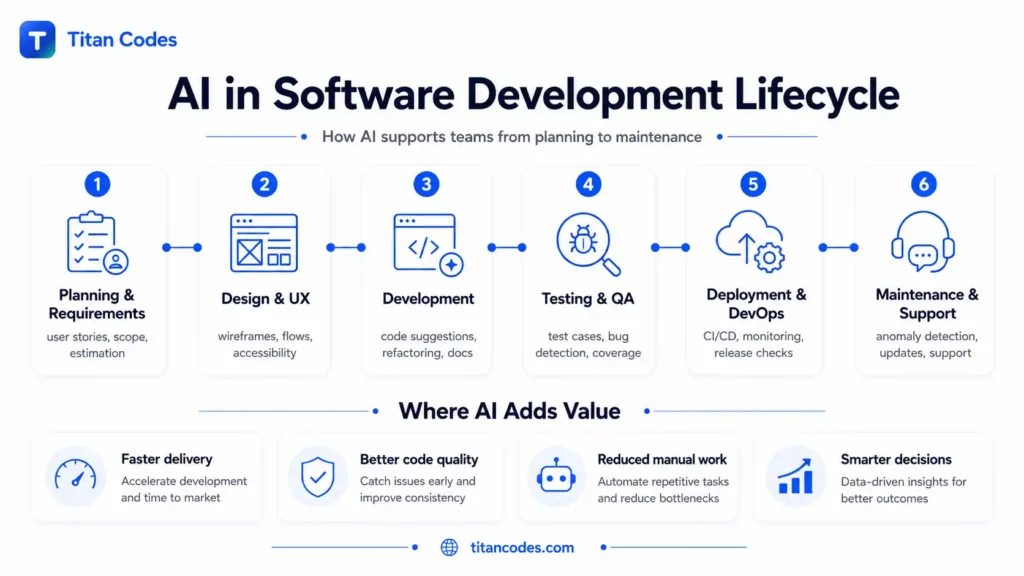
Requirement Analysis and Planning
Many software projects fail or become expensive because requirements are unclear. AI can help teams convert rough ideas into structured requirements, user stories, feature lists, and acceptance criteria.
For example, a startup founder may explain an MVP idea in plain language. AI can help convert that idea into modules, user roles, workflows, and possible technical requirements. A product manager can then review and refine the output before development begins.
AI can help with:
- Identifying missing requirements
- Creating user stories
- Suggesting acceptance criteria
- Estimating project complexity
- Highlighting possible risks
- Prioritizing features for an MVP
This is especially useful for businesses planning MVP development or a new SaaS product.
UI and UX Design
AI can assist designers and product teams by suggesting layouts, user flows, accessibility improvements, and interface variations. It can also help generate quick wireframe ideas or analyze design patterns based on user behavior.
AI does not replace UX thinking. A tool can suggest a layout, but humans still need to understand user intent, brand positioning, conversion goals, and business context.
AI can help with:
- User flow ideas
- Wireframe suggestions
- Design consistency checks
- Accessibility recommendations
- Personalization concepts
- UI copy suggestions
For businesses building websites, SaaS platforms, or mobile apps, AI can speed up early design exploration before the final design is reviewed by a human team.
Code Generation and Development
Code generation is the most visible use of AI in software development. Tools like GitHub Copilot, Cursor, Tabnine, Cody, and Amazon Q Developer can suggest code, complete functions, explain logic, and help developers work faster.
AI is useful for:
- Writing boilerplate code
- Creating repetitive functions
- Explaining unfamiliar code
- Refactoring existing code
- Suggesting alternative implementations
- Generating API examples
- Helping developers learn new frameworks
However, AI-generated code should never be accepted blindly. It may look correct but still contain logic errors, security weaknesses, poor architecture, or performance issues.
The best use of AI in coding is not “write everything for me.” It is “help me move faster while I stay in control.”
Testing and Quality Assurance
AI can improve testing by generating test cases, identifying risky code changes, detecting bugs, and expanding test coverage. This helps teams catch problems earlier, before they become expensive production issues.
AI can help with:
- Unit test generation
- Regression test suggestions
- UI testing
- Security testing
- Bug detection
- Test prioritization
- Self-healing test scripts
- Code coverage improvement
For example, if a developer changes a checkout flow, AI-assisted testing can help identify which user journeys need extra attention. This reduces manual QA effort and helps teams release with more confidence.
Deployment and DevOps
Deployment is another area where AI can create value. AI can monitor CI/CD pipelines, detect unusual build failures, predict release risks, and help engineering teams respond faster when something breaks.
AI can support DevOps through:
- Deployment failure prediction
- Log analysis
- Anomaly detection
- Incident alerts
- Performance monitoring
- Rollback recommendations
- Infrastructure optimization
Google Cloud’s 2025 DORA Report announcement noted a positive relationship between AI adoption and software delivery throughput and product performance. This supports the idea that AI can help beyond coding when it is integrated into the broader delivery process.
Maintenance and Support
After software is launched, AI continues to be useful. It can analyze logs, detect performance issues, summarize errors, support customers, and help developers understand old code faster.
AI can help with:
- Monitoring application health
- Predicting failures
- Analyzing user feedback
- Summarizing support tickets
- Finding root causes faster
- Updating documentation
- Explaining legacy code
- Suggesting refactoring opportunities
This matters because software cost does not end at launch. Maintenance, security updates, bug fixes, feature improvements, and performance optimization are all part of long-term software success.
Practical Use Cases of AI in Software Development
AI is not limited to coding assistants. It can support many practical business and engineering use cases.
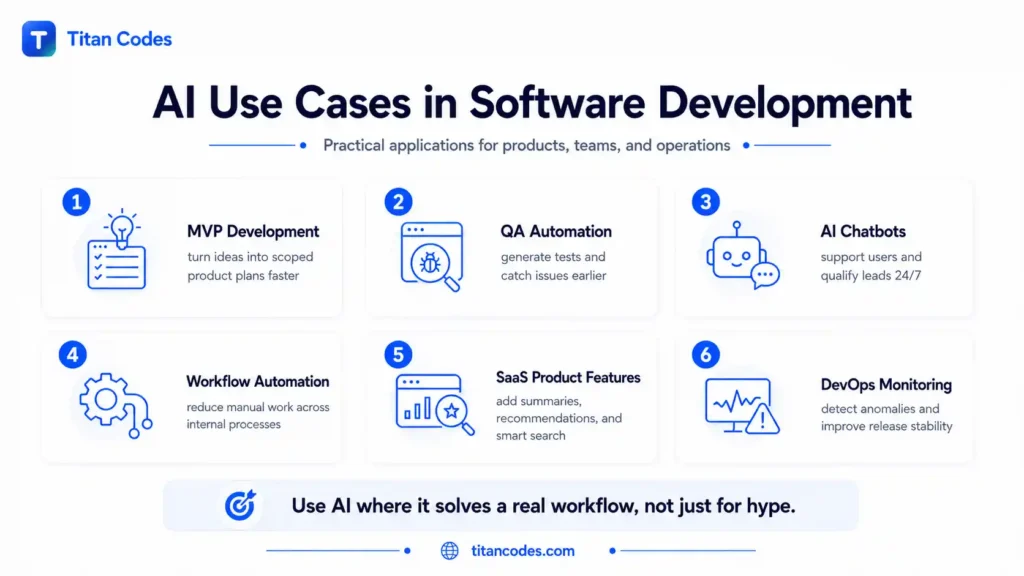
AI-Assisted MVP Development
For founders and early-stage businesses, AI can help turn a rough product idea into a clearer MVP scope. It can support feature mapping, user story creation, competitor research, prototype planning, and documentation.
This helps teams avoid overbuilding and focus on what should be launched first.
For example, if a founder wants to build a booking platform, AI can help outline core modules such as user registration, service listings, booking calendar, payment flow, admin dashboard, notifications, and analytics. A development team can then validate the logic and convert it into a proper technical plan.
Custom Software and Workflow Automation
Many businesses still depend on spreadsheets, manual approvals, disconnected tools, and repetitive admin work. AI can help convert these operations into smarter software workflows.
Examples include:
- Lead routing automation
- CRM updates
- Invoice processing
- Report generation
- Support ticket classification
- Document summarization
- Approval workflows
- Internal dashboards
- Email and notification automation
This is where AI connects directly with custom software development and AI automation. Instead of using AI only to write code, businesses can use AI inside the software itself to reduce manual work.
AI-Powered Web Applications
AI can make web applications more intelligent. A normal dashboard shows data. An AI-powered dashboard can summarize data, detect patterns, suggest actions, and answer questions in plain language.
Examples include:
- Sales dashboards with AI insights
- Admin panels with automated summaries
- Customer portals with AI support
- HR tools with document analysis
- Analytics platforms with natural language reports
- Workflow tools with smart task recommendations
For businesses planning a browser-based platform, AI can be integrated into web application development from the beginning.
SaaS Product Development
SaaS companies can use AI to improve product functionality, onboarding, support, analytics, and automation.
AI can support SaaS products through:
- AI onboarding assistants
- Usage-based recommendations
- Customer support chatbots
- Automated reporting
- Smart notifications
- Churn risk signals
- Data enrichment
- In-app content generation
- Admin workflow automation
When building a SaaS product, AI should be planned around the actual value it gives users. Adding AI just because it is trending can make the product confusing and expensive. Adding AI to solve a real user problem can make the product more useful and competitive.
If you are planning a SaaS product, Titan Codes offers SaaS development services focused on MVP scope, dashboards, billing, user workflows, and scalable product architecture.
AI Chatbots and Customer Support
AI chatbots are one of the most common ways businesses adopt AI. A well-built chatbot can answer common questions, qualify leads, collect customer details, route requests, and hand off complex cases to humans.
AI chatbots can support:
- Website enquiries
- Product FAQs
- Customer support
- Booking flows
- Lead qualification
- Internal knowledge search
- Support ticket summaries
The key is to build the chatbot around approved knowledge, clear limits, and a human handoff path. A generic chatbot that gives random answers can damage trust. A properly scoped chatbot can improve response speed and reduce support workload.
Titan Codes provides AI chatbot development for websites, support workflows, lead qualification, routing, and human handoff.
Legacy Software Modernization
AI can help developers understand and modernize older codebases. It can explain unfamiliar logic, identify unused code, suggest refactoring opportunities, and support migration planning.
This is useful when businesses have older systems that still work but are difficult to maintain. AI can speed up analysis, but experienced developers are still needed to make architecture decisions and prevent business-critical logic from breaking.
Benefits of AI in Software Development
AI brings value when it is used with the right process and human oversight.
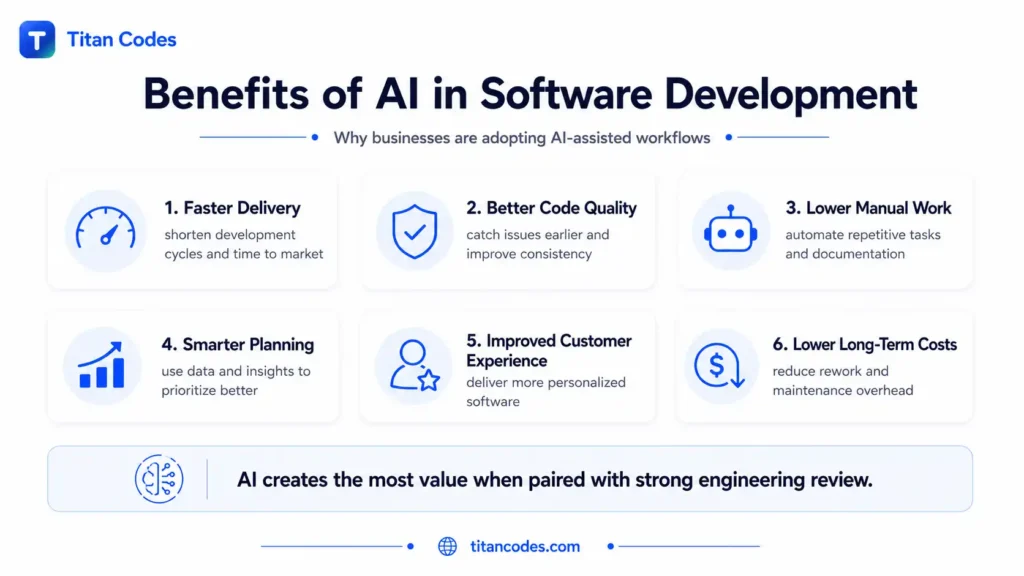
Faster Development Cycles
AI can speed up repetitive work such as writing boilerplate code, generating test cases, drafting documentation, and explaining existing logic. This allows developers to spend more time on architecture, problem-solving, and product quality.
Better Code Quality
AI tools can help identify bugs, code smells, security issues, and inconsistent patterns earlier in the development cycle. This reduces the chance of defects reaching production.
However, AI improves code quality only when developers review and validate its suggestions. Poorly reviewed AI-generated code can create the opposite effect.
Reduced Manual Work
Many development tasks are repetitive. AI can automate parts of code writing, testing, documentation, monitoring, and reporting. This gives teams more time for work that requires judgment and creativity.
Faster Documentation
Documentation is often ignored because teams are busy shipping features. AI can help generate API docs, code explanations, release notes, onboarding guides, and internal knowledge base content.
This makes the project easier to maintain and easier for new developers to understand.
Smarter Decision-Making
AI can analyze historical data, sprint activity, errors, user behavior, and system logs to support better decisions. It can help teams understand where bottlenecks exist and what should be improved first.
Better User Experiences
AI can personalize software experiences, recommend content, simplify search, automate responses, and help users complete tasks faster. For customer-facing applications, this can improve engagement and satisfaction.
Where AI Helps Most and Where It Still Fails
AI is powerful, but it has limits. Businesses need to understand both sides.
| AI Is Strong At | AI Is Weak At |
| Writing boilerplate code | Understanding full business context |
| Suggesting code snippets | Making architecture decisions alone |
| Generating documentation drafts | Taking responsibility for software quality |
| Creating test cases | Understanding complex product trade-offs |
| Finding patterns in logs and code | Replacing senior engineering judgment |
| Refactoring repetitive code | Guaranteeing secure code |
| Explaining existing code | Knowing whether a feature is truly useful |
| Summarizing tickets and errors | Owning business outcomes |
AI works best when the task is clear, structured, repetitive, and reviewable. It struggles when the task requires deep context, domain knowledge, product strategy, or accountability.
Risks and Challenges of AI in Software Development
AI adoption should be practical, not blind. Before using AI in software development, businesses should understand the risks.
AI-Generated Code Can Be Wrong
AI can produce code that looks correct but fails in real-world conditions. It may misunderstand requirements, miss edge cases, or create inefficient logic.
Every AI-generated output should be reviewed, tested, and validated before use.
Security Vulnerabilities
AI-generated code can introduce security weaknesses if it is not checked carefully. A study on security weaknesses in AI-generated code found that AI code generation tools can produce snippets affected by security issues. You can read the study here: Security Weaknesses of Copilot-Generated Code in GitHub Projects.
For business-critical applications, security review is not optional.
Over-Reliance on AI
Developers who depend too much on AI may stop thinking deeply about logic, architecture, and edge cases. This can reduce code quality over time.
AI should support developer thinking, not replace it.
Intellectual Property and Licensing Concerns
Businesses should be careful about how AI-generated code is used, especially in proprietary software. Teams need clear policies for AI tools, data privacy, code ownership, and acceptable usage.
Poor Context Understanding
AI tools do not automatically understand business goals, customer expectations, compliance needs, or internal workflows. Without proper context, they may generate technically acceptable but practically wrong solutions.
More Code Does Not Always Mean Better Software
AI can help generate code quickly, but speed can create clutter if teams do not control architecture. A project with more code, more features, and more automation is not always better. Good software is clear, maintainable, secure, and aligned with business goals.
Popular AI Tools Used in Software Development
Different tools support different parts of the software development process.
AI Coding Assistants
- GitHub Copilot
- Cursor
- Tabnine
- Cody
- Amazon Q Developer
- Google Gemini Code Assist
These tools help with code suggestions, autocomplete, refactoring, and code explanation.
Code Quality and Security Tools
- SonarQube
- Snyk
- Qodo
- DeepCode-style code analysis tools
These tools help teams detect bugs, vulnerabilities, and quality issues.
AI Testing Tools
- Testim
- Applitools
- Mabl
- Qodo
These tools support automated testing, UI testing, regression testing, and test case generation.
Documentation Tools
- Mintlify
- Swimm
- AI-powered documentation assistants
These tools help generate and maintain technical documentation.
DevOps and Monitoring Tools
- Datadog AI features
- New Relic AI
- Dynatrace
- AI-assisted CI/CD monitoring tools
These tools help teams analyze incidents, monitor systems, and improve deployment reliability.
Low-Code and No-Code AI Tools
- Lovable
- Bolt
- Replit AI
- Bubble AI features
These tools help create prototypes and simple applications faster. They are useful for validation, but serious business software still needs proper engineering, security, and scalability planning.
Best Practices for Using AI in Software Development
AI works best when teams use it with clear rules and measurable goals.
Start With a Specific Use Case
Do not start with “we need AI everywhere.” Start with one clear problem.
For example:
- We need faster test generation.
- We need better documentation.
- We need to reduce manual support tickets.
- We need to automate CRM updates.
- We need to speed up MVP planning.
Focused use cases are easier to test, measure, and improve.
Keep Human Review Mandatory
AI-generated code, tests, documentation, and recommendations should be reviewed by humans. This is especially important for security, payments, authentication, user data, compliance, and business-critical workflows.
Create AI Usage Guidelines
Teams should define where AI can be used, what data can be shared, how outputs should be reviewed, and which tools are approved.
Guidelines should cover:
- Code review rules
- Security checks
- Data privacy
- Tool permissions
- Documentation standards
- Testing expectations
- Human approval points
Measure Real Impact
AI adoption should be measured by business and engineering outcomes, not just tool usage.
Track metrics such as:
- Development cycle time
- Bug rate
- Code review time
- Test coverage
- Deployment frequency
- Incident rate
- Documentation quality
- Support ticket reduction
- Customer satisfaction
Bain & Company’s 2025 research notes that writing and testing code account for only about 25% to 35% of the time from initial idea to product launch. That means businesses need to improve the full lifecycle, not just coding speed. You can read the report here: From Pilots to Payoff: Generative AI in Software Development.
Use AI With Strong Architecture
AI can generate code, but it should not define your entire architecture without expert review. Architecture affects scalability, security, maintainability, performance, and cost.
A good development team should decide:
- Which stack to use
- How data should be structured
- How APIs should be designed
- How authentication should work
- How the system should scale
- How integrations should be maintained
- How future features should be added
AI can support these decisions, but humans should own them.
Will AI Replace Software Developers?
No, AI will not fully replace software developers. It will replace some repetitive tasks, but not the full role of a developer.
Software development is not just writing code. Developers understand business problems, design system logic, make architecture decisions, review security, manage trade-offs, debug complex issues, and take responsibility for the final product.
AI can assist with coding, testing, documentation, and analysis. But developers are still needed to guide the work, review outputs, make decisions, and ensure the software actually solves the right problem.
The role of developers is shifting.
| Traditional Developer Role | AI-Era Developer Role |
| Writes most code manually | Guides and reviews AI-assisted code |
| Focuses heavily on syntax | Focuses more on logic, architecture, and outcomes |
| Writes documentation manually | Reviews and improves AI-generated documentation |
| Debugs from scratch | Uses AI to narrow down possible causes |
| Builds repetitive features manually | Automates repeatable development tasks |
| Works only as an implementer | Acts as engineer, reviewer, strategist, and AI workflow designer |
The developers who grow with AI will become more valuable, not less.
What AI Means for Businesses
For businesses, AI in software development is not only about faster coding. The bigger opportunity is building smarter systems.
AI can help businesses:
- Build MVPs faster
- Reduce manual operations
- Improve customer support
- Automate internal workflows
- Create smarter dashboards
- Personalize user experiences
- Improve reporting and decision-making
- Modernize old systems
- Improve software maintenance
- Connect tools through AI-powered automation
For example, a company may not need “AI software” as a separate product. It may need AI inside its CRM, admin dashboard, customer portal, reporting system, or support workflow.
That is where AI becomes practical.
Instead of asking, “How can we use AI?” businesses should ask, “Which repetitive, slow, or decision-heavy workflow can AI improve?”
The Future of AI in Software Development
The future of software development will be more AI-assisted, more automated, and more focused on human judgment.
Some important trends include:
AI-Native Development Environments
Development tools will become more conversational and context-aware. Instead of only suggesting one line of code, AI tools will understand larger parts of the codebase and help with planning, refactoring, testing, and deployment.
AI Agents for Development Workflows
AI agents will support multi-step tasks such as analyzing requirements, generating implementation plans, editing files, running tests, and summarizing results. These systems will need strict permissions, logs, guardrails, and human approval.
More Automated QA
AI testing tools will become better at generating tests, identifying risky code changes, and maintaining test scripts as applications evolve.
Smarter DevOps and Monitoring
AI will help teams detect incidents faster, predict failures, analyze logs, and improve deployment quality.
Growth of Low-Code and No-Code Development
Non-technical users will create more prototypes and internal tools using natural language. However, production-ready software will still need engineering review, scalability planning, security, and long-term maintenance.
Stronger Governance
As AI becomes part of critical software workflows, businesses will need policies for privacy, security, IP, bias, auditability, and accountability.
How Titan Codes Helps Businesses Build AI-Powered Software
At Titan Codes, we see AI as a development accelerator, not a shortcut.
Businesses do not need AI for hype. They need AI when it improves speed, accuracy, decision-making, customer experience, or workflow efficiency.
Titan Codes helps businesses plan and build practical software systems, including:
- Custom software development for dashboards, portals, workflow systems, and internal tools
- SaaS development for MVPs, subscription platforms, admin systems, and scalable product foundations
- Web application development for browser-based platforms, APIs, dashboards, and business workflows
- AI automation services for lead handling, CRM updates, reporting, support workflows, and repetitive operations
- AI agent development for tool-connected workflows with clear boundaries, logs, approvals, and human review
- AI chatbot development for website support, lead qualification, FAQs, routing, and human handoff
The goal is not to add AI everywhere. The goal is to use AI where it creates measurable value.
If your business is planning a software product, workflow automation system, SaaS platform, or AI-powered application, Titan Codes can help turn the idea into a clear technical plan and launch-ready system.
Conclusion
The role of AI in software development is growing quickly, but its value depends on how it is used.
AI can help developers write code faster, generate tests, improve documentation, detect bugs, monitor systems, and automate repetitive workflows. It can help businesses reduce manual work, build smarter products, and move faster from idea to launch.
But AI does not replace strong software engineering. It does not remove the need for architecture, testing, security, product thinking, or human review.
The best results come when AI and developers work together. AI handles repetitive and pattern-based work. Humans define the goal, make decisions, review quality, and ensure the software solves a real business problem.
For businesses and developers, the future is not AI replacing software development. The future is AI-assisted software development, where good teams use intelligent tools to build better products with more speed, clarity, and control.
FAQs
-
What is the role of AI in software development?
The role of AI in software development is to support teams across planning, coding, testing, deployment, documentation, monitoring, and maintenance. AI helps automate repetitive tasks, improve code quality, detect issues earlier, and speed up development workflows.
-
How is AI used in the software development lifecycle?
AI is used in requirement analysis, UI/UX design, code generation, automated testing, CI/CD monitoring, documentation, performance monitoring, and post-launch support. It helps teams work faster and make better technical decisions.
-
Will AI replace software developers?
AI will not fully replace software developers. It will automate some repetitive tasks, but developers will remain responsible for architecture, logic, quality, security, product decisions, and business alignment.
-
What are the benefits of AI in software development?
The main benefits include faster development cycles, improved code quality, better testing, faster documentation, reduced manual work, smarter decision-making, improved maintenance, and better user experiences.
-
How can businesses use AI in custom software development?
Businesses can use AI in custom software for workflow automation, reporting, support ticket handling, CRM updates, customer portals, dashboards, lead qualification, document processing, and internal operations.
-
How can Titan Codes help with AI-powered software development?
Titan Codes helps businesses build custom software, SaaS platforms, web applications, AI automation systems, AI agents, and AI chatbots. The focus is on practical AI integration that improves real workflows, not unnecessary AI features.