
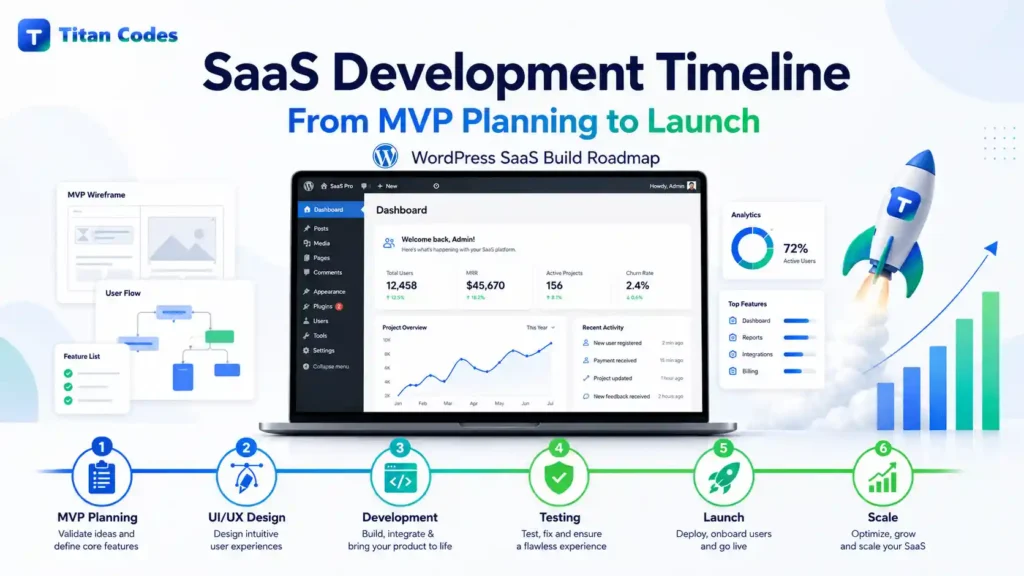
“How long will it take to build my SaaS?”
Most founders hear the same answer: “It depends.”
That answer is technically true, but it does not help when you need to plan a launch, prepare marketing, update investors, onboard beta users, or budget for development.
The better answer is this:
A prototype or validation MVP can take 2 to 4 weeks. A simple SaaS MVP can take 6 to 8 weeks. A standard SaaS product with authentication, dashboard, billing, admin panel, integrations, testing, and launch preparation usually takes 8 to 12 weeks. A complex or regulated SaaS product can take 14 to 18+ weeks.
The confusion starts because people use the word “MVP” for very different things. A clickable prototype, a landing page, a no-code test, a private beta, and a launch-ready SaaS product are not the same.
At Titan Codes, we build software, SaaS platforms, websites, AI systems, MVPs, and UI/UX experiences around a clear launch path. This guide breaks down a realistic SaaS development timeline from MVP planning to launch, so you know what happens each week, what causes delays, and how to protect your release date.
What Is a SaaS MVP?
A SaaS MVP is the smallest usable version of your product that allows real users to experience the core value of your software.
It is not a cheap version of your final product. It is not every feature with fewer screens. It is not a half-working demo.
A proper MVP should test one core assumption:
Will the target user use this product, understand its value, and be willing to pay for it?
The Lean Startup methodology explains that an MVP helps teams begin learning as quickly as possible through a build, measure, learn cycle. The goal is not just to build software. The goal is to validate whether the product should be built further. The Lean Startup describes validated learning as the real unit of progress for startups.
For SaaS, an MVP usually includes:
- User signup and login
- Core dashboard
- One primary workflow
- Database and backend logic
- User roles or permissions
- Billing or subscription setup
- Basic admin controls
- Product analytics
- Error tracking
- Responsive UI
- Security basics
- Beta testing and launch setup
A SaaS MVP usually does not need:
- Advanced reporting
- Multiple complex dashboards
- Native mobile apps
- White-label features
- Enterprise SSO
- Custom billing infrastructure
- Ten integrations
- Full automation for every edge case
- Over-designed UI animations
If you are still defining your product scope, our MVP development service can help you turn a rough product idea into a practical build plan before development starts.
SaaS Development Timeline by Complexity
Here is a realistic view of how long SaaS development takes based on the product type.
| SaaS Type | Realistic Timeline | Best For |
| Prototype or validation MVP | 2 to 4 weeks | Testing demand, demos, clickable flows, landing page validation |
| Simple SaaS MVP | 6 to 8 weeks | One user type, one core workflow, basic dashboard, standard billing |
| Standard SaaS MVP | 8 to 12 weeks | Auth, dashboard, roles, admin panel, payments, integrations, QA |
| Complex SaaS MVP | 14 to 18 weeks | Multi-tenant SaaS, marketplace, real-time features, AI workflows |
| Regulated or enterprise SaaS | 16 to 24+ weeks | Healthcare, fintech, compliance-heavy SaaS, enterprise auth |
The fastest timeline is possible only when the scope is tight, the team is experienced, the founder responds quickly, and the tech stack is familiar.
The slowest timelines usually happen when requirements are unclear, features keep changing, approvals take too long, or the product needs compliance, complex integrations, or enterprise-level security.
The Short Answer: How Long Does SaaS Development Take?
For most founders, the practical answer is:
A launch-ready SaaS MVP takes 8 to 12 weeks.
That timeline usually includes discovery, UX planning, UI design, development, billing setup, testing, beta release, and launch preparation.
A 30-day MVP can be possible, but only when the product is extremely focused. For example, one user type, one workflow, minimal design, no complex integrations, and no compliance requirements.
A 12-week SaaS build is more realistic when the product needs multiple roles, dashboards, subscription billing, third-party tools, admin features, analytics, and proper QA.
If your product includes AI automation, custom workflows, internal tools, or backend-heavy business logic, a custom software development approach may be more appropriate than treating it as a simple MVP.
Week 1 to 2: Discovery, Scope, UX, and Technical Planning
The first two weeks decide whether your SaaS launch stays on track or starts slipping before development even begins.
This stage is not just about meetings. It is where the product becomes clear enough to build.
Key activities include:
- Understanding the business goal
- Defining the target user
- Mapping the core user journey
- Prioritizing MVP features
- Removing non-essential features
- Creating wireframes or clickable prototypes
- Choosing the tech stack
- Planning the database
- Defining user roles and permissions
- Creating the development roadmap
The most important output from this phase is a locked MVP scope.
Founders often want to start coding immediately, but unclear planning usually causes expensive rework later. A few days spent clarifying scope can save weeks of confusion during development.
For SaaS products, this is also where UI/UX decisions matter. Users may forgive a small feature set, but they rarely forgive a confusing experience. Our UI/UX design process focuses on clear flows, responsive screens, dashboards, forms, and conversion paths before development starts.
Go or no-go checkpoint after week 2
Before moving ahead, confirm:
- Is the MVP scope clear?
- Is the main user flow approved?
- Are the core screens designed or wireframed?
- Is the tech stack selected?
- Are user roles and permissions defined?
- Are required third-party tools identified?
- Are business priorities clear?
If these answers are not clear, development should not move into full build mode yet.
Week 3 to 4: Foundation and Product Setup
Weeks 3 and 4 are where the technical foundation gets built.
This stage may not look exciting from the outside, but it is critical. A SaaS product is not just a website with login. It needs a stable backend, secure user management, structured data, and a foundation that can grow.
Key activities include:
- Frontend and backend setup
- Hosting environment setup
- Database schema creation
- Authentication setup
- User account management
- Role-based access planning
- Tenant or workspace structure
- Basic dashboard layout
- API structure
- Initial deployment pipeline
For B2B SaaS, multi-tenancy is often a major part of the architecture. Multi-tenancy means different customers or teams can use the same application while their data remains separated.
Tools like Clerk provide organization-based structures for building multi-tenant B2B apps with roles and permissions, while database tools like Supabase support Row Level Security for protecting data access at the database layer. Clerk Organizations explain how users can belong to multiple organizations with roles and permissions, and Supabase Row Level Security explains how access policies can protect data at the row level.
By the end of week 4, your SaaS should have the basic product structure in place. Users may be able to sign up, log in, access a dashboard shell, and interact with early product screens.
Week 5 to 6: Core Feature Development
Weeks 5 and 6 are where the main SaaS value gets built.
This is the part of the product that users actually came for. If you are building a project management SaaS, this may be task and workflow management. If you are building an analytics SaaS, this may be the reporting dashboard. If you are building an AI SaaS, this may be the core AI workflow or automation engine.
Key activities include:
- Building the primary user workflow
- Creating database operations
- Connecting frontend and backend logic
- Adding validation and error handling
- Implementing permissions
- Building key dashboard views
- Creating onboarding steps
- Testing the core workflow internally
This stage should focus on one core workflow, not five half-built workflows.
A common mistake is trying to build every feature that might be useful. That is how timelines slip. A strong MVP focuses on the smallest feature set that proves the product’s value.
For example, if your SaaS helps agencies manage client approvals, the MVP does not need advanced reporting, team workload forecasting, and custom branding on day one. It needs a smooth approval workflow that users can understand and complete.
By the end of week 6, the core value of the SaaS should be visible.
Go or no-go checkpoint after week 6
Before expanding into payments, polish, or launch prep, confirm:
- Does the core workflow work from start to finish?
- Can a user complete the main action without help?
- Are permissions working properly?
- Is the data model stable?
- Are there any major architecture concerns?
- Are unnecessary features being pushed into version 1.1?
If the core workflow is not working by this point, the timeline is at risk. The right response is usually to reduce scope, not to rush everything else.
Week 7 to 8: Payments, Integrations, Admin, and AI Workflows
Weeks 7 and 8 are where the SaaS starts becoming commercially usable.
For many SaaS products, this includes billing, subscription plans, admin tools, email workflows, analytics, and third-party integrations.
Key activities include:
- Stripe subscription setup
- Pricing plans
- Checkout flow
- Customer portal
- Billing webhooks
- Failed payment handling
- Email notifications
- Admin dashboard
- Product analytics
- Error monitoring
- Third-party API integrations
Stripe Billing is commonly used for SaaS subscriptions because it supports recurring payments, invoices, subscription states, payment retries, dunning, and webhook-based lifecycle events. Stripe’s subscription documentation explains that subscription billing includes statuses, invoice events, retry logic, and access provisioning based on subscription state.
If your SaaS uses AI features, this is also where AI workflows may be connected. That could include AI agents, chatbot flows, document analysis, lead qualification, internal automation, or a RAG knowledge base.
At Titan Codes, our AI automation and AI agent development services are useful when a SaaS product needs automation beyond standard software workflows.
However, AI should support the product, not distract from the MVP. If the core SaaS workflow is weak, adding AI will not fix the product.
Week 9 to 10: QA, UI Polish, Security, and Performance
By weeks 9 and 10, the product may be working, but working is not the same as launch-ready.
This stage is about turning a functional SaaS product into something users can trust.
Key activities include:
- Bug fixing
- Cross-browser testing
- Responsive testing
- Mobile layout checks
- Empty states
- Loading states
- Error messages
- Accessibility basics
- Performance optimization
- Security review
- Permission testing
- Payment flow testing
- Backup and monitoring setup
Security should not be treated as an afterthought. OWASP publishes the Top Ten Web Application Security Risks as a standard awareness document for developers and application security teams. The current OWASP Top Ten helps teams identify critical web application risks and improve secure coding practices. OWASP Top Ten lists the most current version and explains its role as a developer security awareness standard.
For SaaS products, the most important QA areas include:
- Can users access only their own data?
- Are subscription states handled correctly?
- Do failed payments behave correctly?
- Are admin actions restricted?
- Are sensitive API keys protected?
- Do forms validate data correctly?
- Does the product work on mobile?
- Are analytics and error tracking working?
Skipping QA may save a week now, but it often creates bigger problems after launch.
Week 11 to 12: Beta Testing and Launch Preparation
The final stage is beta testing and launch readiness.
This is where real users test the SaaS before the public launch. Even a small beta group can reveal issues that the internal team missed.
Key activities include:
- Inviting beta users
- Watching user behavior
- Collecting feedback
- Fixing high-priority bugs
- Improving unclear flows
- Testing payment scenarios
- Finalizing production setup
- Setting up monitoring
- Preparing support process
- Preparing launch pages and emails
- Final launch checklist
A soft launch is safer than a public launch. It lets you find problems with a controlled group before more users arrive.
At this point, your website also matters. A SaaS launch needs more than an app login screen. It needs a clear landing page, pricing page, product messaging, FAQs, analytics, conversion tracking, and strong CTAs. Our website development and web application development services can support both the public-facing website and the actual SaaS application.
SaaS Launch Readiness Checklist
Before launching your SaaS publicly, check the following:
- Signup and login work properly
- Password reset works
- Main dashboard loads correctly
- Core workflow works from start to finish
- User roles and permissions are tested
- Tenant or workspace data is isolated
- Stripe payments are tested
- Failed payment scenarios are tested
- Subscription upgrades and cancellations work
- Admin panel works
- Email notifications are tested
- Analytics are installed
- Error monitoring is installed
- Backups are configured
- Mobile layout is tested
- Security basics are complete
- Beta users have tested the product
- Support process is ready
- Launch website is ready
- Terms, privacy policy, and important legal pages are live
- Production domain and SSL are configured
If several of these are missing, the product may be functional, but it is not launch-ready.
Why Some SaaS MVPs Take Only 30 Days
You may see some agencies or founders claim that a SaaS MVP can be built in 30 days.
Sometimes, that is true.
A 30-day MVP is possible when:
- The product has one user type
- There is one main workflow
- Design is simple
- The tech stack is already decided
- There are no complex integrations
- Payments are not complex
- The founder gives fast feedback
- The team has built similar SaaS products before
- The goal is validation, not full launch maturity
A 30-day MVP is not realistic when the product needs:
- Multi-tenancy
- Multiple user roles
- Billing complexity
- Enterprise permissions
- AI agents
- Real-time collaboration
- Native mobile apps
- Compliance requirements
- Advanced reporting
- Multiple integrations
The better way to think about it is this:
A 30-day MVP can help you validate a product idea. An 8 to 12 week SaaS timeline is more realistic when you want a product that users can sign up for, use, pay for, and trust.
What Delays SaaS Development Timelines?
Most SaaS delays are predictable. They usually come from the same problems.
1. Scope creep
This is the biggest timeline killer.
A founder asks for “just one small feature” during development. That feature needs design, development, testing, edge case handling, and possibly database changes. One small feature can become one extra week.
The solution is simple: keep new ideas in a version 1.1 backlog.
2. Unclear requirements
If the team does not know exactly what to build, they will make assumptions. Wrong assumptions lead to rework.
The solution is to define user flows, feature priorities, and acceptance criteria before development starts.
3. Slow feedback
If approvals take three days instead of one day, the project slows down quickly.
During SaaS development, founders should block 5 to 10 hours per week for reviews, answers, and decisions.
4. Too many stakeholders
When five people need to approve every screen, progress slows.
The solution is to choose one decision-maker who owns final approval.
5. Third-party integration issues
Stripe, email tools, CRM APIs, analytics platforms, and AI APIs all have edge cases.
The solution is to identify integrations early and avoid unnecessary tools during MVP development.
6. Custom everything
Custom authentication, custom billing, custom design systems, custom infrastructure, and custom admin panels all increase timeline.
Use proven tools where possible. Save custom work for the parts that make your SaaS unique.
7. Perfectionism
Your MVP should be polished enough to use, but not overloaded.
Users need clarity, reliability, and value. They do not need every future feature on day one.
How AI Changes the SaaS Development Timeline
AI can speed up parts of software development, but it does not remove the need for planning, product thinking, architecture, QA, and human review.
Research on GitHub Copilot found that developers completed a controlled coding task 55.8% faster with AI assistance. However, more recent research also shows that AI productivity gains vary by context, project complexity, and review burden. The GitHub Copilot productivity study found strong gains in a controlled task, while later research on experienced developers found that AI can slow work in mature codebases when review and correction effort increases.
For SaaS development, AI is most useful for:
- Boilerplate generation
- Test case suggestions
- Documentation support
- UI variations
- Data transformation logic
- Internal automation
- Support workflows
- AI-powered product features
AI is not a replacement for:
- Product strategy
- User research
- Architecture decisions
- Security review
- Code ownership
- UX clarity
- Launch planning
This is why Titan Codes treats AI as part of a practical build system, not as a shortcut around engineering quality.
How to Protect Your SaaS Timeline
If you want to stay on schedule, follow these rules.
Freeze MVP scope early
After planning is complete, avoid adding features unless they are critical to the core value.
Build one core workflow first
Do not split attention across too many features. A strong MVP does one thing clearly.
Use proven technologies
Reliable stacks, known frameworks, and tested third-party tools reduce risk.
Review progress weekly
Weekly demos help catch problems early.
Respond quickly
Fast founder feedback protects momentum.
Plan for beta testing
Do not treat beta as optional. Real users always find issues the internal team missed.
Define launch readiness
Before development starts, define what must be true before launch.
How to Recover When the Timeline Slips
If your SaaS timeline starts slipping, do not panic and do not immediately add more people.
Adding developers late can increase coordination work and slow the project further. The better recovery method is scope control.
Use this process:
Step 1: Identify the real cause
Is the delay caused by unclear requirements, design changes, technical issues, slow feedback, or underestimated integrations?
Step 2: Protect the core workflow
Do not cut the main value of the product. Cut secondary features first.
Step 3: Move non-essential features to version 1.1
This gives you a clean path to launch without losing good ideas.
Step 4: Reset priorities
Focus only on what is needed for users to sign up, experience value, and provide feedback.
Step 5: Communicate clearly
If the timeline needs to move, update stakeholders early. A controlled delay is better than a broken launch.
Final Answer: What Timeline Should You Expect?
Here is the practical answer:
- 2 to 4 weeks: prototype, clickable demo, landing page, or validation MVP
- 6 to 8 weeks: simple SaaS MVP with one core workflow
- 8 to 12 weeks: standard SaaS MVP with dashboard, auth, billing, integrations, QA, and launch prep
- 14 to 18+ weeks: complex SaaS with automation, real-time features, marketplace logic, or AI workflows
- 16 to 24+ weeks: regulated or enterprise SaaS with compliance, enterprise auth, audits, and advanced security
The timeline depends less on coding speed and more on scope clarity, team experience, founder responsiveness, technical complexity, and launch-readiness requirements.
A good SaaS development timeline is not just a deadline. It is a controlled path from idea to working product, from MVP to beta users, and from beta to launch.
If you are planning a SaaS product and want a realistic roadmap before development starts, Titan Codes can help you define the right scope, timeline, design direction, tech stack, and launch path.
Book a strategy call with Titan Codes to discuss your SaaS idea and get a practical MVP-to-launch plan.