
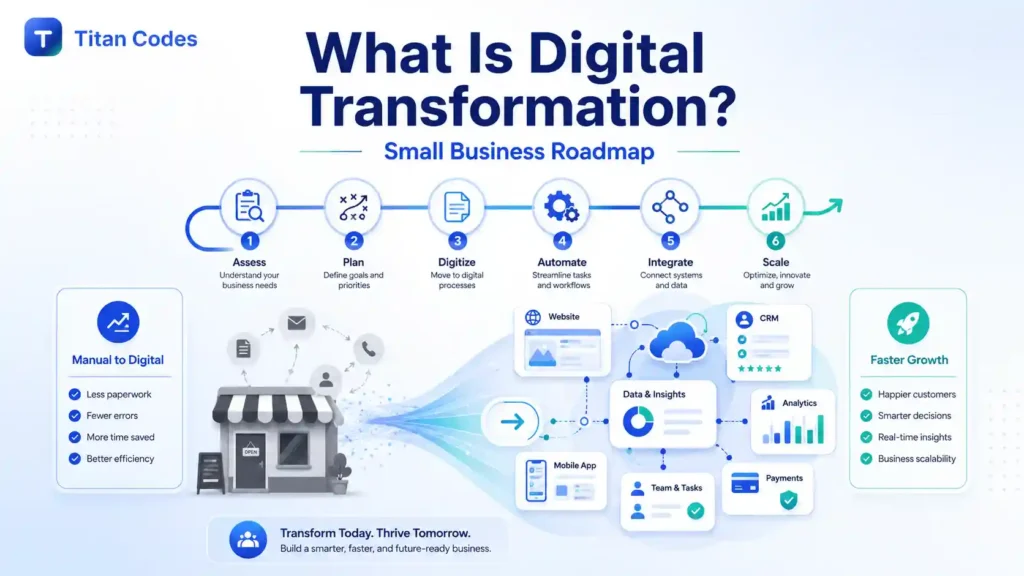
Digital transformation is often described as adopting new technology, moving systems to the cloud, or adding artificial intelligence to a business.
Those activities can be part of a transformation, but they are not the transformation itself.
A company does not become digitally transformed simply because it buys a CRM, launches a new website, subscribes to several software platforms, or gives employees access to AI tools. Real transformation happens when technology changes how work moves through the business and produces a measurable improvement.
For a small or growing business, that improvement might mean:
- Responding to leads in minutes instead of hours
- Giving customers a self-service portal
- Connecting website enquiries to a CRM
- Reducing manual data entry
- Automating repetitive follow-ups
- Making company knowledge easier to find
- Generating reports without rebuilding spreadsheets
- Supporting more customers without increasing headcount at the same rate
This is why digital transformation should begin with a business problem, not a technology trend.
Investment in digital transformation continues to grow. IDC projects that worldwide digital transformation investment will approach $4 trillion by 2028 and account for approximately 70% of total information and communications technology spending. However, spending more on technology does not guarantee better results. The value comes from selecting the right problem, redesigning the workflow, connecting the right systems, and measuring what changes after implementation. IDC’s digital transformation research supports the view that businesses are becoming more selective and outcome-focused with these investments.
This guide explains what digital transformation means for small and growing businesses, how to identify the right opportunities, which technologies to consider, where AI and RAG knowledge systems fit, and how to move from an idea to a controlled implementation.
What Is Digital Transformation?
Digital transformation is the strategic redesign of business processes, customer experiences, and operating models using connected digital technologies.
For a small or growing business, it usually means replacing manual work, fragmented information, and disconnected tools with integrated software, automation, data, cloud systems, and AI that improve a specific business outcome.
Digital transformation is not about taking every existing process and making it slightly faster. It requires a business to examine how work is currently done, identify unnecessary steps, and decide how technology can create a better way of operating.
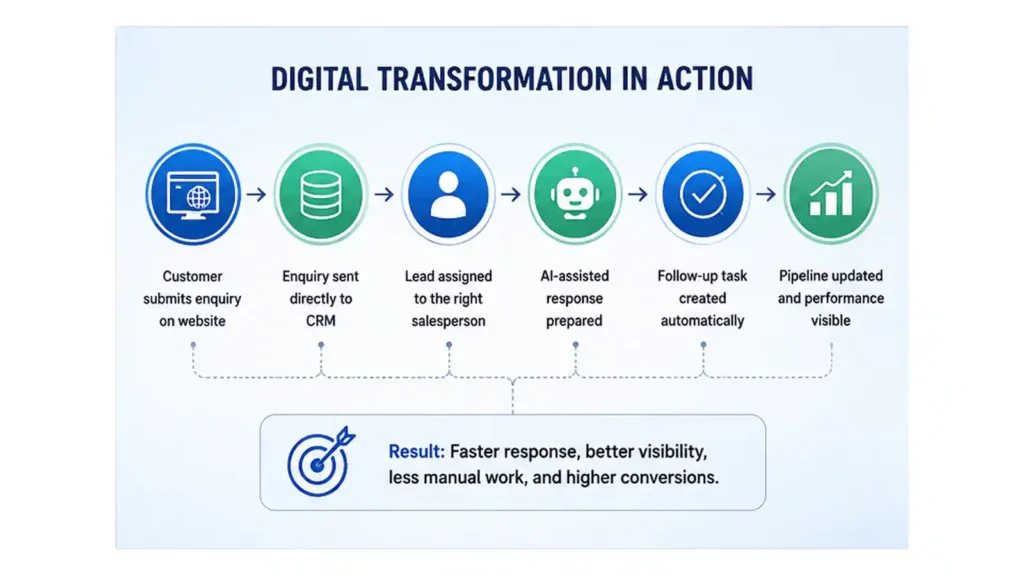
Consider a common sales process.
A prospective customer submits an enquiry through a website. Someone checks the inbox, copies the details into a spreadsheet, forwards the enquiry to a salesperson, prepares a response, and creates a reminder to follow up.
That process is digital because it uses email and a spreadsheet, but it is not well transformed.
A digitally transformed version could work like this:
- The website sends the enquiry directly to a CRM.
- The system identifies the requested service.
- The lead is assigned to the appropriate salesperson.
- An AI-assisted workflow prepares a response for review.
- A follow-up task is created automatically.
- The sales pipeline is updated.
- Management can see response times and conversion rates.
The result is not simply more technology. It is a connected process that is faster, more visible, and less dependent on memory.
Digitization vs Digitalization vs Digital Transformation
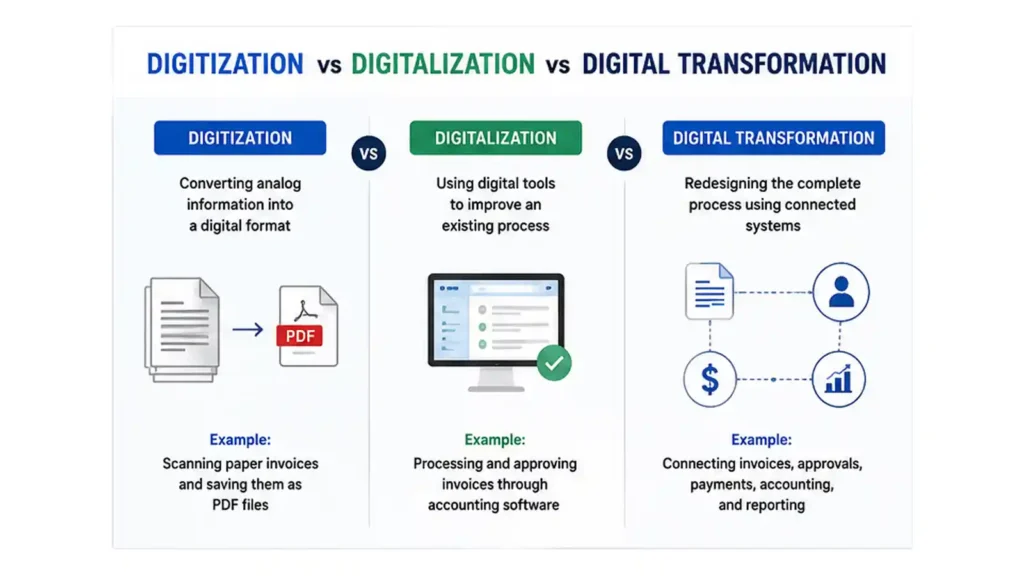
These terms are frequently used as though they mean the same thing, but they represent different levels of change.
| Concept | Meaning | Business example |
| Digitization | Converting analog information into a digital format | Scanning paper invoices and saving them as PDF files |
| Digitalization | Using digital tools to improve an existing process | Processing and approving invoices through accounting software |
| Digital transformation | Redesigning the complete process using connected systems | Connecting invoices, approvals, payments, accounting, and reporting |
| AI-enabled transformation | Adding language understanding, retrieval, prediction, or decision support | Extracting invoice data with AI, flagging discrepancies, and routing exceptions to a manager |
A company may digitize thousands of documents without changing how employees use them. It may also subscribe to several applications while leaving employees to move information between those applications manually.
Digital transformation occurs when the technology, data, process, and responsibilities work together.
A Simple Way to Understand the Difference
Digitization changes the format.
Digitalization improves a task.
Digital transformation changes how the business operates.
AI-enabled transformation adds controlled intelligence to the new operating model.
Why Digital Transformation Matters for Small Businesses
Large enterprises may pursue transformation to modernize legacy systems or standardize operations across thousands of employees.
Small businesses usually have more immediate concerns:
- Limited staff
- Tight operating budgets
- Founder dependency
- Scattered information
- Manual administration
- Missed follow-ups
- Inconsistent customer service
- Software that does not communicate
- Limited reporting visibility
- Difficulty scaling existing processes
The OECD notes that digitalization can help small and midsize enterprises improve productivity, access new markets, strengthen resilience, and compete more effectively. It also identifies limited resources, skills gaps, financial constraints, and low awareness as continuing barriers. OECD research on SME digitalization reinforces why a focused, incremental strategy is more practical than a large, company-wide technology program for most smaller organizations.
Customers Expect Faster and More Connected Experiences
Modern customers interact with businesses through websites, email, social media, mobile applications, chat, and messaging platforms. They expect the company to recognize their previous interactions and provide consistent information across those channels.
Salesforce reports that 88% of surveyed customers say good customer service makes them more likely to purchase again. It also found that 71% are more likely to trust a company with personal data when the company clearly explains how that data is used. Salesforce’s customer expectations research shows that convenience, personalization, and trust must be designed together.
A small business does not need a complex enterprise platform to improve customer experience. It may need a better website enquiry flow, a connected CRM, automated appointment reminders, or a knowledge-based support assistant.
Manual Work Becomes More Expensive as the Business Grows
A process that works with 20 customers may break at 200 customers.
When every new customer requires additional spreadsheet updates, email forwarding, document preparation, and manual follow-up, growth creates administrative pressure instead of operating leverage.
Digital transformation helps separate growth from repetitive workload. It creates processes that can support more customers, transactions, or employees without increasing manual work at the same rate.
Disconnected Data Leads to Poor Decisions
Many growing companies have useful data, but it is spread across:
- Website forms
- CRM platforms
- Email inboxes
- Accounting systems
- Customer support tools
- Spreadsheets
- Project management applications
- Documents and shared drives
When these sources do not communicate, leaders spend time collecting information instead of using it.
Connecting systems through API development and integration can create a more reliable flow of customer, sales, operational, and financial information.
Technology Is Becoming More Accessible
The U.S. Census Bureau reported that between December 2025 and May 2026, approximately 17% to 20% of U.S. businesses were using AI in at least one business function. Adoption remained lower among the smallest firms, with fewer than 20% of businesses with four or fewer employees reporting AI use. The Census Bureau’s business AI research shows that smaller companies are interested in AI, but many are still at an early stage of practical implementation.
The opportunity is not to adopt every new AI tool. It is to identify where AI can support a controlled business process.
Signs Your Business Needs Digital Transformation
Digital transformation may sound like a strategic initiative, but the need usually appears through everyday operational problems.
Customer and Sales Problems
Your business may need a better digital system if:
- Leads arrive through multiple channels and are not recorded consistently.
- Enquiries are lost in inboxes or messaging applications.
- Customers wait too long for basic answers.
- Follow-ups depend on employees remembering them.
- Sales representatives cannot see a complete interaction history.
- Quotations and proposals take too long to prepare.
- Customers have no way to check project, order, or service status.
- Different team members provide different answers to the same question.
Operational Problems
Common warning signs include:
- Employees repeatedly copy information between systems.
- Approvals happen through long email or chat threads.
- Reports take hours or days to prepare.
- The same information is entered more than once.
- A process stops when one employee is unavailable.
- Documents are stored without consistent naming or ownership.
- Teams use different versions of the same file.
- Management cannot see where work is delayed.
Knowledge Problems
Knowledge becomes a transformation issue when:
- Policies and procedures are spread across multiple folders.
- Employees repeatedly ask experienced team members the same questions.
- Support staff spend significant time searching for answers.
- New employees struggle to find approved information.
- Product or service details are inconsistent across teams.
- Employees cannot confirm whether a document is current.
- General AI tools produce answers that do not reflect company policies.
A RAG knowledge base AI system can help when the primary problem is finding and using approved business knowledge. It allows an AI assistant to retrieve information from selected documents and systems before preparing a response. Titan Codes designs these systems around source control, retrieval quality, access boundaries, evaluation, citations, and human escalation.
Technology Problems
Your current technology may be limiting the business if:
- Important systems cannot exchange information.
- Your website does not connect to sales or support workflows.
- Spreadsheets are being used as core business applications.
- Existing software requires excessive workarounds.
- Employees create unofficial tools because approved systems are difficult to use.
- The infrastructure becomes unreliable during periods of higher demand.
- Access permissions are unclear.
- Software ownership, backups, and maintenance responsibilities are not documented.
If several of these problems happen every week, the solution may not be another isolated software subscription. The business may need a connected operating model.
The Five Areas of Digital Transformation
A practical transformation strategy should consider five related areas.
1. Customer Experience
Customer experience transformation improves how customers discover, evaluate, purchase, use, and receive support for a product or service.
Examples include:
- Faster website enquiry handling
- Online appointment booking
- Customer portals
- Digital quotations
- Ecommerce systems
- Personalized communication
- Self-service support
- Automated notifications
- Mobile applications
- Project or order tracking
A web application may provide customers with dashboards, booking tools, document access, or account management. An AI chatbot may answer routine questions, collect requirements, qualify leads, and escalate complex enquiries.
2. Business Operations
Operational transformation focuses on reducing delays, repetitive work, and errors.
Examples include:
- Approval workflows
- Invoice processing
- Lead routing
- Employee onboarding
- Document extraction
- Task creation
- Inventory alerts
- Scheduling
- Reporting
- CRM updates
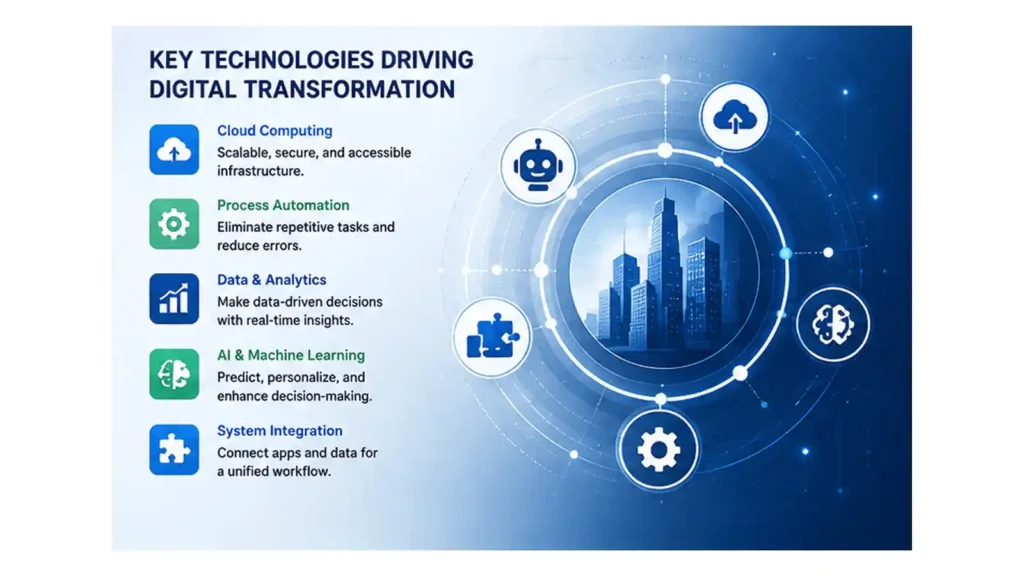
AI automation services can support workflows that involve language, documents, classification, summaries, or decision support. Traditional automation remains useful when the steps are predictable and rule-based. Titan Codes’ automation approach combines workflow mapping, APIs, approved tool actions, human review, logging, and measurable outputs.
3. Data and Decision-Making
Data transformation makes business information easier to access, interpret, and act on.
It may include:
- Centralized customer data
- Connected dashboards
- Sales pipeline reporting
- Customer behavior analysis
- Operational performance tracking
- Revenue forecasting
- Inventory reporting
- Data quality controls
- Automated weekly summaries
The objective is not to collect as much data as possible. It is to make the right data available to the right person at the right time.
4. Knowledge and Workforce Enablement
Employees cannot work efficiently when knowledge is scattered, outdated, or difficult to verify.
Knowledge transformation may include:
- Searchable operating procedures
- Internal knowledge bases
- Employee assistants
- Policy retrieval
- Training resources
- Product documentation
- Support playbooks
- Source-aware AI answers
A well-designed knowledge system should make approved information easier to retrieve without removing access controls or human judgment.
5. Digital Products and Business Models
Some transformations create new revenue opportunities rather than only improving existing processes.
Examples include:
- SaaS platforms
- Customer portals
- Subscription products
- Online marketplaces
- Mobile applications
- Digital memberships
- Self-service tools
- AI-powered services
Businesses developing a new digital product may require SaaS development, custom software development, cloud architecture, user management, payments, analytics, and ongoing product support.
Digital Transformation Maturity Model
Not every business begins at the same stage. A maturity model can help you understand your current position and define a realistic next step.
| Stage | Characteristics | Recommended priority |
| Manual | Paper, email, spreadsheets, and employee memory drive the process | Document the workflow and identify repeated work |
| Digitized | Information is stored digitally, but tools remain isolated | Standardize data and remove duplicate systems |
| Connected | Website, CRM, finance, and support systems exchange information | Improve data quality and process visibility |
| Automated | Rules trigger tasks, updates, reminders, and notifications | Add monitoring, exception handling, and human review |
| Intelligent | AI retrieves knowledge, understands language, and supports decisions | Add evaluation, permissions, governance, and continuous improvement |
The goal is not to reach the final stage in every process. Some workflows only need digitization or basic automation.
For example, a simple appointment reminder may not need artificial intelligence. A support assistant that must understand questions, retrieve approved policies, and provide cited answers may benefit from AI and RAG.
A Practical Digital Transformation Roadmap
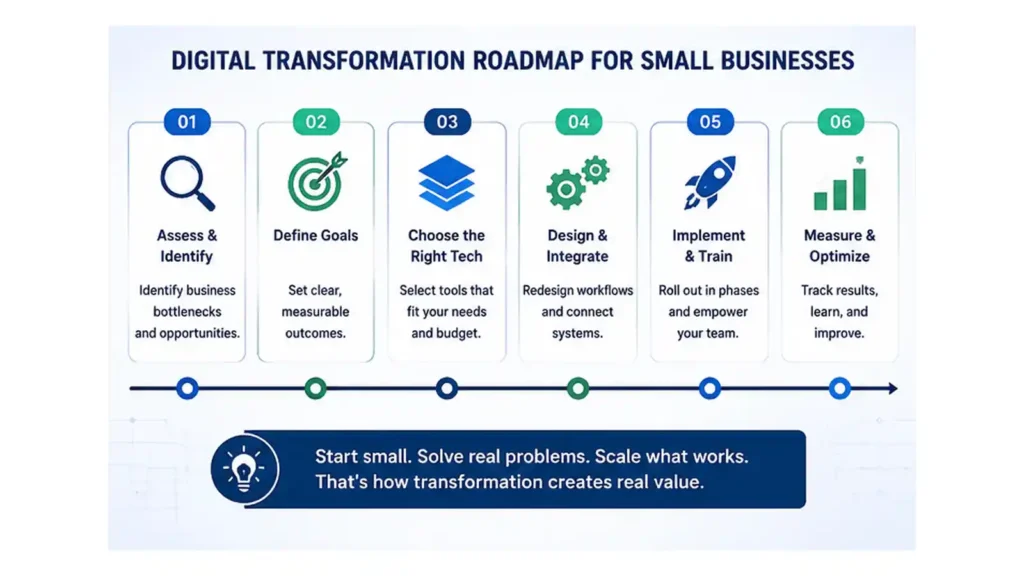
A strong digital transformation roadmap moves from a measurable problem to a controlled solution.
Step 1: Start With the Business Pain Point
Do not begin with statements such as:
- We need AI.
- We need an app.
- We should move everything to the cloud.
- We need a new CRM.
- We should automate the business.
These are proposed solutions, not business problems.
A useful problem statement is specific and measurable:
- Thirty percent of website enquiries are not followed up within one business day.
- Support employees spend two hours each day searching for product information.
- Invoice approvals take an average of five working days.
- Weekly reporting requires eight hours of manual spreadsheet work.
- Customers contact the business repeatedly because they cannot see order status.
- New employees require several weeks to learn where internal information is stored.
A clear problem statement keeps the project connected to business value.
Step 2: Map the Current Workflow
Document how the process works today.
Record:
- Where the process begins
- Who participates
- What information is required
- Which tools are used
- Where information is entered
- Where delays occur
- Where errors happen
- Which decisions require judgment
- What the customer experiences
- What happens when the normal process fails
Example: Current Lead Workflow
Trigger
A prospective customer submits a website form.
Current steps
- The form sends an email.
- An employee checks the inbox.
- The employee copies the details to a spreadsheet.
- The enquiry is forwarded to a salesperson.
- The salesperson prepares a response.
- A reminder is created manually.
- Management requests a pipeline update later.
Problems
- Enquiries may be overlooked.
- Response time depends on inbox monitoring.
- Lead information is duplicated.
- Follow-up is inconsistent.
- Management has limited visibility.
This workflow is now ready for redesign.
Step 3: Define the Desired Business Outcome
Decide what should improve before selecting technology.
Possible outcomes include:
- Reduce lead response time
- Increase completed follow-ups
- Shorten approval cycles
- Reduce manual data entry
- Improve first-contact resolution
- Give employees faster access to approved information
- Improve sales pipeline visibility
- Reduce customer support workload
- Increase self-service completion
- Improve reporting accuracy
The outcome should be connected to a baseline measurement.
If the current average response time is six hours, a project can aim to reduce it to one hour. If a report takes eight hours to prepare, the project can target one hour of review time.
Step 4: Prioritize Opportunities
Most businesses will identify several possible transformation projects. Attempting all of them at once creates cost, disruption, and implementation risk.
Score each opportunity against:
- Business impact
- Frequency
- Customer impact
- Revenue influence
- Time currently consumed
- Error rate
- Data readiness
- Technical complexity
- Compliance risk
- Employee readiness
A basic prioritization formula is:
Priority score = business impact × frequency ÷ implementation difficulty
This is not a complete financial model, but it helps separate practical opportunities from attractive distractions.
The best first project is usually:
- Frequent
- Measurable
- Painful
- Narrow enough to control
- Supported by accessible data
- Valuable to customers or employees
Step 5: Choose Whether to Buy, Build, Integrate, Automate, or Use RAG
The right transformation does not always require custom development.
| Approach | Best used when | Example |
| Buy | The requirement is standard and proven software already exists | Accounting, video meetings, payroll |
| Build | The workflow is unique or creates competitive advantage | Custom customer portal or operational platform |
| Integrate | Existing systems work individually but do not exchange data | Connecting website forms, CRM, accounting, and reporting |
| Automate | The process is repetitive and has identifiable triggers and outputs | Lead routing, invoice reminders, document processing |
| Use RAG | Answers must be grounded in approved company knowledge | Internal policy assistant or customer support knowledge bot |
| Use an AI agent | The workflow requires knowledge retrieval and approved actions across tools | Searching records, updating a CRM, preparing a reply, and creating a task |
When to Buy Software
Buy an existing product when:
- The workflow is common across many businesses.
- Configuration can meet most requirements.
- Speed is more important than differentiation.
- The process is not central to your competitive advantage.
- The subscription cost is lower than maintaining a custom system.
When to Build Custom Software
Consider custom software development when:
- The workflow is specific to the business.
- Existing products require excessive workarounds.
- The system directly affects customer experience.
- The business needs specialized permissions, reporting, or integrations.
- The software supports a new product or revenue model.
- Owning the technical foundation is strategically important.
When to Integrate Existing Systems
Integration is often the most practical option when the existing applications are useful but disconnected.
For example, a business may already have:
- A capable website
- A CRM
- An accounting platform
- An email system
- A project management tool
Replacing all of them may be unnecessary. An integration layer can move information between them and reduce duplicate entry.
When to Use AI Automation
Use AI automation when a workflow involves:
- Reading messages or documents
- Classifying requests
- Summarizing information
- Drafting responses
- Extracting structured data
- Scoring leads
- Routing work
- Preparing reports
- Supporting decisions
Keep human approval for financial commitments, legal conclusions, medical decisions, sensitive customer communication, and other high-risk outputs.
For more practical examples, read AI Automation for Small Businesses.
When to Use a RAG Knowledge Base
A RAG knowledge base is useful when employees or customers need reliable answers from approved business information.
Common source material includes:
- Policies
- Product documentation
- Service descriptions
- Standard operating procedures
- Contracts
- Training material
- Technical manuals
- Support articles
- FAQs
- Internal notes
- Website content
Read What Is a RAG Knowledge Base? for a more detailed explanation.
Step 6: Design the Future Workflow
The redesigned workflow should define:
- The trigger
- The required data
- The system actions
- The automation or AI actions
- The human review point
- The customer-facing output
- The fallback process
- The error-handling process
- The event that will be measured
Example: Future Lead Workflow
Trigger
A prospective customer submits a website form.
Automated flow
- The enquiry is added to the CRM.
- The service category is identified.
- The lead is assigned to the correct team member.
- A response draft is prepared.
- A salesperson reviews and sends the response.
- A follow-up task is scheduled.
- The lead status appears in a dashboard.
- Delayed responses trigger an alert.
The future workflow should make responsibility clearer, not hide it behind automation.
Step 7: Prepare the Data
Digital systems are only as reliable as the information they use.
Before implementation:
- Remove duplicate records.
- Identify outdated documents.
- Define the approved source of truth.
- Assign information owners.
- Standardize important fields.
- Confirm access permissions.
- Document retention requirements.
- Separate sensitive information.
- Define how data will be updated.
For a RAG project, source preparation is especially important. The system needs clear document ownership, useful structure, metadata, retrieval rules, and processes for replacing outdated material.
Step 8: Launch a Controlled Pilot
Start with:
- One team
- One workflow
- One customer segment
- One document collection
- One business location
- One measurable outcome
A pilot should include:
- A clear owner
- Defined users
- Approved data
- Acceptance criteria
- A fallback process
- Test cases
- Baseline measurements
- A review date
- A decision about what happens next
McKinsey’s 2025 AI survey found that 88% of respondents reported regular AI use in at least one business function, but only about one-third said their organizations had begun scaling AI programs across the enterprise. The research suggests that experimentation is common, while repeatable value and organization-wide scaling remain more difficult.
A pilot helps a smaller company learn before making a larger commitment.
Step 9: Train Users and Manage Change
People are not a secondary part of digital transformation.
Employees need to understand:
- Why the process is changing
- Which problem the new system solves
- How their daily work will change
- What they remain responsible for
- Which decisions remain human
- How to report incorrect outputs
- How to request improvements
- Who owns the system
Training should use real scenarios, not only feature demonstrations.
Employees are more likely to adopt a system when it removes a known frustration and when their feedback has influenced the design.
Step 10: Measure, Improve, and Scale
Compare performance before and after launch.
Ask:
- Did response time improve?
- Did the error rate decrease?
- Did employees save time?
- Did customers use the new process?
- Did support volume change?
- Were previously missed leads recovered?
- Did the system create new risks?
- Which exceptions still require manual handling?
- Does the solution justify continued investment?
Scale the project only after the core workflow is stable.
Business Pain Points and Practical Digital Solutions
| Business problem | Practical solution | Relevant Titan Codes capability |
| Leads are lost or followed up late | Connect forms, email, messaging, and CRM; automate assignment and reminders | CRM development and AI automation |
| Customers repeatedly ask the same questions | Build a chatbot grounded in approved service and policy information | AI chatbot development and RAG knowledge base AI |
| Employees cannot find internal information | Create a searchable knowledge assistant with source citations and permissions | RAG knowledge base AI |
| Reports require manual spreadsheet work | Connect data sources and build an automated reporting dashboard | Custom software development and API integration |
| Existing software cannot support the workflow | Build an internal web application or operational system | Web application development |
| Customers lack self-service options | Build a portal, dashboard, booking system, or mobile application | Web application development and SaaS development |
| AI needs to complete approved actions across tools | Build an agent with defined permissions, logs, and human handoff | AI agent development |
| Systems cannot exchange information | Build APIs, webhooks, and a reliable integration layer | API development and integration |
| Usage is growing faster than infrastructure | Move to scalable hosting with backups, monitoring, and deployment controls | Cloud services |
Where RAG Knowledge Base AI Fits Into Digital Transformation
Many growing businesses do not have an information shortage. They have an information retrieval problem.
Useful knowledge is spread across:
- PDFs
- Shared drives
- Emails
- Notion pages
- Product documentation
- Policies
- Support tickets
- Website pages
- Training material
- Spreadsheets
- CRM notes
Employees know that an answer exists, but they do not know where to find it or whether the version they found is current.
What Is RAG?
RAG stands for retrieval-augmented generation.
A RAG system retrieves relevant information from approved sources before an AI model prepares an answer. This makes it possible to ground responses in company-specific information instead of relying only on the model’s general training.
A basic RAG workflow looks like this:
- A user asks a question.
- The system interprets the request.
- It searches approved knowledge sources.
- Relevant passages are retrieved.
- The AI prepares an answer using those passages.
- Sources or citations are displayed.
- Low-confidence questions are escalated.
- User feedback is recorded.
Where RAG Creates Business Value
RAG can support:
- Customer service
- Employee onboarding
- Product support
- Sales enablement
- Policy search
- Compliance assistance
- Technical documentation
- Standard operating procedures
- Internal help desks
- Agent-assist workflows
For example, a customer support representative could ask:
What is our refund policy for annual subscriptions purchased through a partner?
Instead of searching several folders, the assistant retrieves the approved policy, provides an answer, and links to the source.
When RAG Is Not the Right Solution
A RAG system may not be appropriate when:
- Source documents are inaccurate.
- Information changes without ownership or review.
- The requirement is purely transactional.
- The business has very little repeatable knowledge.
- Users cannot be given appropriate access.
- The project requires actions but not knowledge retrieval.
- The company is unwilling to maintain the source material.
RAG does not correct a poorly managed knowledge environment automatically. The content, permissions, retrieval logic, testing, and feedback process must be designed together.
Practical Digital Transformation Examples
Large-company examples are useful, but small businesses need scenarios that resemble their own operations.
Example 1: Professional Services Company
Problem
Enquiries arrive through the website, email, advertisements, and messaging applications. Follow-up quality varies by employee.
Solution
Connect lead sources to a CRM. Categorize the enquiry, assign an owner, prepare a response draft, schedule follow-up, and track the opportunity.
Human control
A salesperson reviews pricing, scope, and the final response.
KPIs
- Lead response time
- Follow-up completion rate
- Qualified lead rate
- Proposal conversion rate
Example 2: Ecommerce Business
Problem
Customers repeatedly contact support about product specifications, delivery, returns, and warranties.
Solution
Create a RAG-supported assistant using the product catalog, delivery information, return policies, and approved FAQs.
Human control
Refund exceptions and complaints are escalated to support employees.
KPIs
- First-response time
- Ticket deflection rate
- Escalation rate
- Customer satisfaction
- Unsupported-answer rate
Example 3: Healthcare Administration Team
Problem
Employees spend time searching for operating procedures and administrative policies.
Solution
Build a permission-controlled internal knowledge assistant with citations and a clear escalation process.
Human control
Clinical decisions and patient-specific guidance remain with qualified professionals.
KPIs
- Average search time
- Repeated internal questions
- Source retrieval accuracy
- Employee adoption
Example 4: Real Estate Company
Problem
Agents manually qualify enquiries, search listings, and arrange follow-up.
Solution
Connect enquiry forms to a CRM. Classify buyer requirements, retrieve relevant listings, prepare a summary, and notify the assigned agent.
Human control
Agents verify recommendations and manage customer relationships.
KPIs
- Qualification time
- Appointment booking rate
- Lead-to-visit conversion
- Follow-up completion
Example 5: Training and Education Business
Problem
Prospective students ask repetitive questions about courses, schedules, eligibility, fees, and policies.
Solution
Build a source-grounded assistant connected to approved course information and enquiry workflows.
Human control
Admissions decisions, financial commitments, and exceptions are handled by staff.
KPIs
- Enquiry response time
- Application completion
- Escalation rate
- Support workload
How to Calculate Digital Transformation ROI
Digital transformation ROI should compare the complete cost of implementation with the measurable value created.
Cost Categories
Include:
- Software subscriptions
- Design and development
- Integration
- Data preparation
- Cloud infrastructure
- Security
- Training
- Internal employee time
- Maintenance
- Monitoring
- Ongoing improvement
Value Categories
Possible sources of value include:
- Labor hours saved
- Faster customer response
- Recovered sales opportunities
- Higher conversion rates
- Reduced errors
- Reduced support workload
- Faster invoicing
- Improved payment collection
- Lower software duplication
- Reduced operational risk
- New digital revenue
A Simple ROI Formula
Annual value = labor savings + additional gross profit + avoided costs – annual operating cost
ROI percentage = (annual value – initial investment) ÷ initial investment × 100
Illustrative Example
A five-person support team spends a combined 30 hours each week searching for information and answering repeated questions.
Assume the loaded labor cost is $30 per hour.
Current annual search cost:
30 hours × $30 × 52 weeks = $46,800
After implementing a structured knowledge base and support assistant, the company reduces this workload by 15 hours per week.
Estimated annual labor value:
15 hours × $30 × 52 weeks = $23,400
This does not automatically mean the company should reduce staffing. The saved time could be redirected to complex support cases, customer retention, proactive outreach, or documentation improvement.
The estimate should then be compared with implementation, software, infrastructure, and maintenance costs.
KPIs for Digital Transformation
Choose metrics that reflect the original problem.
Customer KPIs
- First-response time
- Resolution time
- Conversion rate
- Customer satisfaction
- Self-service completion
- Repeat purchase rate
- Abandonment rate
Operational KPIs
- Process completion time
- Manual hours per transaction
- Error rate
- Rework rate
- Approval cycle time
- Automation completion rate
- Exception rate
Financial KPIs
- Cost per transaction
- Revenue influenced
- Gross profit improvement
- Operating cost reduction
- Payback period
- Software costs removed
Employee and Knowledge KPIs
- Time spent finding information
- Repeated internal questions
- System adoption
- Training completion
- Knowledge-gap frequency
- Employee satisfaction
Technology KPIs
- System availability
- Integration failures
- Failed workflow rate
- Recovery time
- Security incidents
- Support requests
RAG and AI Quality KPIs
- Correct-source retrieval
- Citation accuracy
- Unsupported-answer rate
- Low-confidence response rate
- Escalation rate
- User feedback score
- Tool-action failure rate
- Human correction rate
Security and Governance Must Be Part of the Roadmap
Digital transformation increases the number of systems, integrations, users, and data flows that must be protected.
IBM’s 2025 Cost of a Data Breach Report placed the global average cost of a breach at $4.44 million. It also found that 63% of the studied organizations lacked AI governance policies to manage AI or prevent uncontrolled shadow AI use. IBM’s report highlights why businesses should not treat governance as something to add after AI deployment.
Small businesses should consider:
- Multifactor authentication
- Role-based permissions
- Least-privilege access
- Backups
- Encryption
- Patch management
- Data retention
- Vendor access
- Incident response
- AI usage policies
- Logging
- Human approval
- Source ownership
The NIST Cybersecurity Framework 2.0 Small Business Quick-Start Guide provides an accessible starting point for small and midsize businesses that have limited cybersecurity resources.
Common Digital Transformation Mistakes
1. Buying Technology Before Defining the Problem
A new platform will not fix an unclear or unnecessary process.
Better approach: Define the bottleneck, baseline, owner, and expected outcome first.
2. Automating a Broken Process
Automation can make a poor process run faster without making it better.
Better approach: Remove unnecessary steps before building the automation.
3. Trying to Transform Everything at Once
A company-wide launch increases risk and makes it difficult to determine which change produced the result.
Better approach: Start with one high-value workflow.
4. Adding More Disconnected Tools
Every new application creates another location for data, permissions, billing, and training.
Better approach: Review integration and data ownership before purchasing software.
5. Ignoring Data Quality
AI and automation cannot reliably use duplicate, outdated, incomplete, or contradictory information.
Better approach: Prepare and assign ownership to important data before implementation.
6. Removing Humans From Sensitive Decisions
Full automation is not appropriate for every task.
Better approach: Keep approval steps for financial, legal, medical, contractual, and high-impact decisions.
7. Giving AI Uncontrolled Access
An AI agent should not have unlimited access to company tools or data.
Better approach: Define approved tools, actions, permissions, logs, fallback paths, and escalation rules.
Titan Codes’ AI agent development approach emphasizes scoped tool access, knowledge grounding, guardrails, testing, logs, and human handoff.
8. Failing to Define Ownership
A transformation project may depend on several vendors, accounts, repositories, and cloud services.
Better approach: Document who owns:
- Source code
- Domains
- Hosting accounts
- Cloud infrastructure
- Data
- API credentials
- Design files
- Documentation
- Monitoring
- Maintenance responsibilities
9. Measuring Activity Instead of Results
The number of tools launched is not a business outcome.
Better approach: Measure response time, errors, conversion, cost, adoption, and customer impact.
A Practical 90-Day Digital Transformation Plan
A smaller business can use a 90-day plan to move from diagnosis to evidence.
Days 1 to 30: Diagnose
- List recurring operational problems.
- Interview employees who perform the work.
- Map one important workflow.
- Establish baseline metrics.
- Audit existing software.
- Identify data sources.
- Review security requirements.
- Select one high-value opportunity.
- Assign a business owner.
Deliverable
A current-state workflow, problem statement, and measurable target.
Days 31 to 60: Design and Pilot
- Design the future workflow.
- Decide whether to buy, build, integrate, automate, or use RAG.
- Prepare data.
- Define permissions.
- Document human approval points.
- Build or configure a limited pilot.
- Test normal cases.
- Test incorrect inputs and failure cases.
- Train initial users.
Deliverable
A working pilot with acceptance criteria and fallback procedures.
Days 61 to 90: Launch and Measure
- Launch for a controlled group.
- Monitor usage and errors.
- Compare results with the baseline.
- Collect employee and customer feedback.
- Improve instructions and workflows.
- Document unresolved risks.
- Decide whether to scale, revise, or stop.
Deliverable
A measured business case for the next phase.
Digital Transformation Readiness Checklist
Use this checklist before starting a project.
Business Readiness
- We have identified a specific business bottleneck.
- We understand its customer, operational, or financial impact.
- We have a business owner for the process.
- We have baseline measurements.
- We have defined the desired outcome.
Process Readiness
- We have mapped the current workflow.
- We know where delays and errors occur.
- We know which steps can be removed.
- We know which decisions require human judgment.
- We have defined exception and fallback paths.
Data Readiness
- We know where relevant information is stored.
- We have identified the approved source of truth.
- We know who owns and updates the information.
- We have reviewed duplicate and outdated records.
- We understand access and retention requirements.
Technology Readiness
- We have listed existing software and integrations.
- We know whether APIs are available.
- We understand hosting and security requirements.
- We have considered buy, build, and integration options.
- We have defined ownership of accounts, code, and data.
Adoption Readiness
- Employees affected by the change are involved.
- Training is included in the plan.
- Feedback and escalation processes are defined.
- Success metrics are agreed upon.
- There is a plan for maintenance and improvement.
Frequently Asked Questions
What is digital transformation in simple terms?
Digital transformation is the process of using connected technologies to improve how a business operates, serves customers, manages information, and grows. It often involves replacing manual or disconnected processes with integrated software, automation, cloud systems, data tools, and AI.
What is an example of digital transformation for a small business?
A small business might connect its website forms to a CRM so that every enquiry is recorded automatically, assigned to the right salesperson, followed up on time, and tracked through the sales pipeline. This improves response time, reduces missed leads, and gives management better visibility.
What should a small business transform first?
Start with a process that is frequent, time-consuming, error-prone, or directly connected to revenue and customer experience. Good starting points include lead management, customer support, appointment scheduling, invoicing, reporting, and internal knowledge retrieval.
What role does AI play in digital transformation?
AI can help businesses classify enquiries, analyze documents, retrieve approved information, prepare responses, generate summaries, and support decision-making. AI should be used within a clearly defined workflow, with reliable data, access controls, monitoring, and human review for sensitive decisions.
How can a business measure digital transformation success?
Success should be measured using business outcomes such as reduced response time, fewer manual hours, lower error rates, faster approvals, improved conversion rates, reduced support workload, higher customer satisfaction, and increased revenue. Businesses should record baseline performance before implementation so they can compare results accurately.
Start With One Business Problem
Digital transformation does not require a company to replace every tool, automate every task, or launch an enterprise-wide technology program.
It requires clarity.
Identify one workflow that creates delays, repeated work, missed opportunities, inconsistent service, or poor visibility. Map how it works today. Define what should improve. Then decide whether the right solution is an existing platform, an integration, custom software, automation, a RAG knowledge system, or a controlled combination of those capabilities.
Start small. Measure the outcome. Improve what works. Expand with evidence.
Titan Codes helps growing businesses plan and build connected digital systems, including custom software, web applications, SaaS platforms, CRM systems, API integrations, AI automation, AI agents, AI chatbots, RAG knowledge base AI, and cloud services.
Share your business problem with Titan Codes to turn a manual or disconnected workflow into a practical transformation roadmap.