
You build a LangGraph agent that remembers what a user said earlier in a conversation. Everything works until the user opens a new chat. Suddenly, the agent no longer knows their preferences. Restart the application, and even the original conversation may disappear.
These are two different memory problems, and LangGraph provides separate mechanisms for handling them.
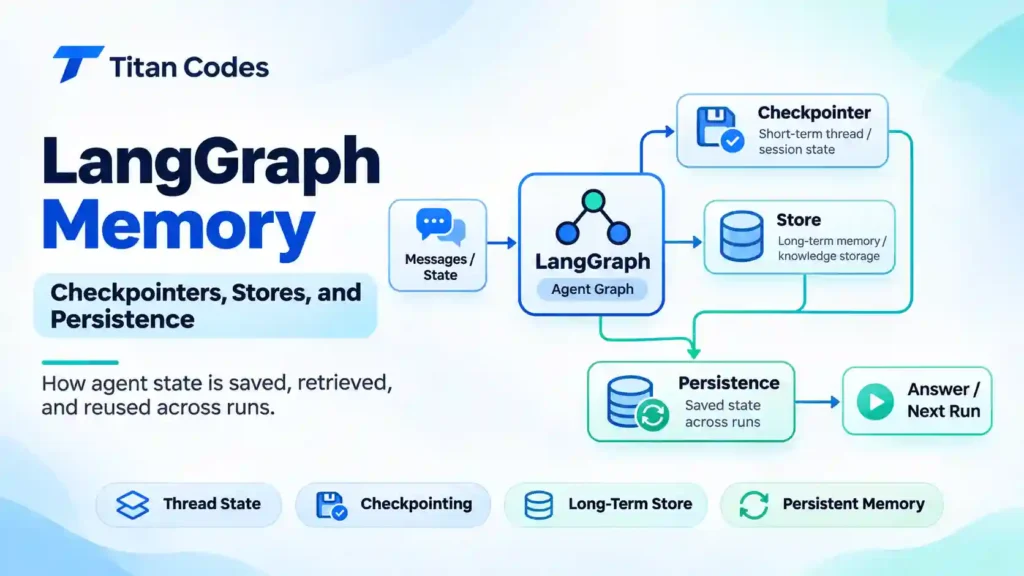
Checkpointers save the state of individual conversations and workflows. Stores save information that needs to be available across conversations. Both can use persistent databases so that information remains available after an application restart.
This guide explains how LangGraph memory works, how thread IDs control conversation history, and how to implement short-term and long-term memory with Python.
What Is LangGraph Memory?
LangGraph memory is a mechanism for retaining information across agent interactions using checkpointed graph state and application-defined storage.
LangGraph separates memory into two broad categories:
- Short-term memory: Information associated with a particular conversation or workflow thread.
- Long-term memory: Information that can be accessed across different threads, such as saved preferences, user facts, or reusable application context.
For example, a customer-support agent might need to remember that a customer already provided an order number earlier in the conversation. That belongs in short-term memory.
The same agent might also need to remember that the customer prefers email communication, even when they start a new conversation. That information can belong in long-term memory.
LangGraph implements these capabilities through checkpointers and stores, as explained in its official persistence documentation.
The memory mechanism itself does not decide what information deserves to be remembered. Developers still need to define what to save, how to retrieve it, and when it should be deleted.
Short-Term vs Long-Term Memory in LangGraph
The most important distinction is not how long the information exists. It is the scope in which that information is available.
| Feature | Short-Term Memory | Long-Term Memory |
| LangGraph mechanism | Checkpointer | Store |
| Scope | Individual thread | Across threads |
| Typical information | Conversation messages, workflow state | Preferences, facts, reusable information |
| Identifier | thread_id | Namespace and key |
| Development implementation | InMemorySaver | InMemoryStore |
| Persistent implementation | SqliteSaver, PostgresSaver | PostgresStore and other persistent stores |
| Survives restart | Depends on backend | Depends on backend |
What Does Short-Term Memory Remember?
Short-term memory retains information belonging to a conversation or workflow.
Depending on how the graph state is designed, this may include messages, intermediate results, task progress, retrieved information, or pending actions.
When the same thread continues, LangGraph can restore the saved state instead of starting from an empty state.
What Does Long-Term Memory Remember?
Long-term memory stores information that should be available beyond one conversation.
Examples include:
- Preferred language
- Communication preferences
- User profile details
- Saved application settings
- Reusable facts and summaries
One point often causes confusion: long-term memory does not automatically mean permanent storage.
An InMemoryStore can share preferences across threads while the application is running. However, the data disappears when that store instance is lost.
Similarly, short-term thread memory can survive restarts when its checkpointer uses a persistent database.
How Do LangGraph Checkpointers Work?
A checkpointer saves snapshots of graph state so a workflow can continue, resume, or be inspected later.
LangGraph operates through nodes and edges. Nodes perform work and update the graph’s state. The checkpointer records that state at execution boundaries called super-steps.
Consider a support workflow:
Customer Message
|
v
Identify Request
|
v
Retrieve Order Details
|
v
Prepare Response
|
v
Send Response
With checkpointing enabled, LangGraph can retain the workflow’s state as execution progresses.
This supports more than conversational memory. It also enables interruption handling, debugging, human approval, and recovery from certain failures.
What Is a Checkpoint?
A checkpoint is a saved snapshot of graph state associated with a particular point in execution.
A snapshot can include:
- Saved state values
- Checkpoint identifiers
- Execution metadata
- Information about the next scheduled node
- Links to earlier checkpoints
The LangGraph checkpointers guide documents the state snapshots and their use in execution history.
When Does LangGraph Save Checkpoints?
LangGraph creates checkpoints at graph super-step boundaries when checkpointing is configured.
The timing of durable writes also depends on the persistence mode.
This is different from saving every word generated by an LLM.
For example, if a node makes a model call and updates the state, checkpointing operates around the graph execution boundary rather than independently saving every output token.
Why Are Checkpointers Useful Beyond Chat History?
Suppose an agent prepares a payment request but requires manager approval.
The workflow may need to stop for several hours.
A checkpointer allows the graph state to be saved so the process can resume after the approval arrives.
This is one reason LangGraph is useful for stateful AI systems, not just chatbots.
If you’re comparing frameworks for such applications, our guide to the best AI agent frameworks explains where LangGraph fits among other orchestration tools.
What Is thread_id in LangGraph?
thread_id identifies the conversation or workflow thread whose state a checkpointer should save and retrieve.
Without the correct thread identifier, an application cannot reliably continue the intended checkpoint history.
A typical configuration looks like this:
config = {
“configurable”: {
“thread_id”: “conversation-101”
}
}
The identifier is passed when invoking the graph.
What Happens When You Reuse the Same Thread ID?
LangGraph can retrieve the state previously saved for that thread.
For example:
Thread: conversation-101
Turn 1: User provides an order number.
Turn 2: User asks about the same order.
Result: The graph can access the saved order number.
The exact information available depends on what the graph stores in its state.
What Happens When You Change the Thread ID?
A new thread starts with separate checkpointed state.
conversation-101
Order number: 12345
conversation-102
No previous order number
This separation is intentional.
Different conversations should not automatically share complete message histories.
Is thread_id the Same as user_id?
No.
A user may have several conversations.
User: user-42
|
+– thread-A
|
+– thread-B
|
+– thread-C
Each thread maintains its own checkpoint history.
All three threads can still access shared user-level memories through a store, provided the application uses the same authorized user namespace.
A thread ID is not an authentication mechanism. Your application must independently verify which user is allowed to access each thread.
How to Add Short-Term and Long-Term Memory in LangGraph
Let’s build a small Python application that demonstrates both memory systems.
Instead of using an LLM, we will use predictable rules. This lets us inspect the actual memory behavior without depending on a model response or paying for an API call.
The example will demonstrate four actions:
- Save a user’s preferred programming language.
- Continue the same thread and count its interactions.
- Open a different thread and retrieve the saved preference.
- Confirm that another user does not receive that preference.
Step 1: Install LangGraph
Use a current Python 3.11 or newer environment.
Install LangGraph:
pip install -U langgraph
No external database or LLM API key is required for this first example.
Step 2: Define the Graph State
Create a file named memory_demo.py.
Start with the imports and state definition:
import operator
from dataclasses import dataclass
from typing import Annotated, TypedDict
from langgraph.graph import StateGraph, START, END
from langgraph.runtime import Runtime
from langgraph.checkpoint.memory import InMemorySaver
from langgraph.store.memory import InMemoryStore
class State(TypedDict, total=False):
input: str
history: Annotated[list[str], operator.add]
reply: str
@dataclass
class Context:
user_id: str
The State class defines what the graph retains.
input contains the latest request.
history records the requests received by the thread.
reply contains the latest response.
The operator.add reducer appends new history entries instead of replacing the existing list.
Context provides the user identifier separately from the graph’s thread state.
Step 3: Create the Memory-Aware Node
Add this function beneath the state definition:
def handle_request(
state: State,
runtime: Runtime[Context]
):
message = state[“input”]
namespace = (
“users”,
runtime.context.user_id,
“preferences”
)
if message.startswith(“remember:”):
language = message.split(“:”, 1)[1].strip()
runtime.store.put(
namespace,
“language”,
{“value”: language}
)
reply = f”Saved language: {language}”
elif message == “preference?”:
item = runtime.store.get(
namespace,
“language”
)
if item is None:
reply = “No language preference saved.”
else:
reply = (
“Preferred language: “
+ item.value[“value”]
)
elif message == “turns?”:
count = len(state.get(“history”, [])) + 1
reply = f”This thread has {count} turns.”
else:
reply = “Unknown request.”
return {
“history”: [message],
“reply”: reply
}
This function illustrates both kinds of memory.
The history update belongs to graph state, which will be retained by the checkpointer.
The runtime.store.put() call saves a separate preference that can be accessed from another thread.
The namespace identifies whose preference is being saved.
The store APIs follow LangGraph’s official stores documentation.
Step 4: Compile the Graph With a Checkpointer and Store
Add:
checkpointer = InMemorySaver()
store = InMemoryStore()
builder = StateGraph(
State,
context_schema=Context
)
builder.add_node(“handle”, handle_request)
builder.add_edge(START, “handle”)
builder.add_edge(“handle”, END)
graph = builder.compile(
checkpointer=checkpointer,
store=store
)
The two memory mechanisms are connected here:
graph = builder.compile(
checkpointer=checkpointer,
store=store
)
InMemorySaver maintains the thread-scoped graph state.
InMemoryStore maintains reusable information across threads.
They solve different problems, even though both currently hold their data in process memory.
Step 5: Test Two Threads for the Same User
Add the following code:
def run(thread_id, user_id, message):
config = {
“configurable”: {
“thread_id”: thread_id
}
}
result = graph.invoke(
{“input”: message},
config,
context=Context(user_id=user_id)
)
print(f”{thread_id}: {result[‘reply’]}”)
run(“thread-A”, “user-42”, “remember: Python”)
run(“thread-A”, “user-42”, “turns?”)
run(“thread-B”, “user-42”, “preference?”)
run(“thread-C”, “user-99”, “preference?”)
Run the file:
python memory_demo.py
Expected output:
thread-A: Saved language: Python
thread-A: This thread has 2 turns.
thread-B: Preferred language: Python
thread-C: No language preference saved.
Notice the difference.
thread-A retains its own interaction history through the checkpointer.
thread-B starts with an independent history but can access the preference saved under user-42.
thread-C belongs to a different user and reads from a different namespace.
This is the basic relationship between checkpointers and stores.
The example assumes the application supplies a trusted user ID. In a real system, that ID must come from authenticated server-side context, not an arbitrary value supplied by the user.
How Do LangGraph Stores Save Long-Term Memory?
A LangGraph store saves key-value information under a namespace.
In our example:
namespace = (
“users”,
“user-42”,
“preferences”
)
The key is:
“language”
And its value is:
{“value”: “Python”}
Together, these identify one stored preference.
How Do You Read a Stored Memory?
Using the store object created earlier:
memory = store.get(
(“users”, “user-42”, “preferences”),
“language”
)
print(memory.value)
Expected output:
{“value”: “Python”}
If the item does not exist, get() returns None.
Can Stores Search Memories?
Yes.
Stores support listing and retrieving items within namespaces.
For example:
items = store.search(
(“users”, “user-42”, “preferences”)
)
for item in items:
print(item.key, item.value)
Semantic search is also possible with a suitable store and embedding configuration.
However, ordinary put(), get(), and namespace-based listing do not require embeddings.
That is worth knowing because an agent storing a few user preferences does not necessarily need a vector database.
How to Inspect Saved LangGraph Checkpoints
A checkpointer is useful only if you can understand what has been saved.
LangGraph provides APIs for inspecting a thread’s current state and its history.
1. Get the Latest State
Using the graph from our previous example:
config = {
“configurable”: {
“thread_id”: “thread-A”
}
}
snapshot = graph.get_state(config)
print(snapshot.values[“history”])
Expected output:
[‘remember: Python’, ‘turns?’]
This confirms that the two interactions belong to the same thread.
The value is coming from checkpointed graph state, not from the cross-thread store.
2. View Checkpoint History
LangGraph also provides:
history = list(
graph.get_state_history(config)
)
for snapshot in history:
print(
snapshot.config[“configurable”][“checkpoint_id”],
snapshot.next
)
This lets you examine saved execution states and identify checkpoint IDs.
The number of checkpoints should not be confused with the number of chat messages. A graph can produce multiple checkpoints during one invocation.
3. Can You Replay Earlier Checkpoints?
Yes.
LangGraph supports replaying execution from selected checkpoints and branching into alternative paths.
Its time-travel documentation explains how to inspect earlier states and resume execution.
There is an important caution: nodes executed after the selected checkpoint may run again.
If those nodes make payments, send emails, or modify external systems, replay can repeat those actions unless appropriate safeguards are implemented.
How to Persist LangGraph Memory After an Application Restart
Our example uses InMemorySaver and InMemoryStore.
Both are convenient for development. Neither provides durable data storage across a complete process restart.
To preserve information after restarting the application, use a persistent backend.
1. Save Checkpoints With SQLite
SQLite is useful for local development and small applications.
Install its LangGraph integration:
pip install -U langgraph-checkpoint-sqlite
Then use a file-backed SQLite checkpointer:
from langgraph.checkpoint.sqlite import SqliteSaver
with SqliteSaver.from_conn_string(
“checkpoints.sqlite”
) as checkpointer:
graph = builder.compile(
checkpointer=checkpointer
)
config = {
“configurable”: {
“thread_id”: “conversation-101”
}
}
graph.invoke(
{“input”: “turns?”},
config,
context=Context(user_id=”user-42″)
)
This assumes you are reusing the builder and Context definitions from the earlier example.
The file checkpoints.sqlite stores the checkpoint data.
When you reopen the same database and use the same thread ID, the saved graph state can be recovered.
The LangGraph SQLite checkpoint implementation documents file-backed connections.
Important: This snippet demonstrates persistent checkpointing only. If you also require long-term preferences, you must provide an appropriate store when compiling the graph.
An InMemoryStore will still lose its contents after a process restart.
2. Use PostgreSQL for Persistent Checkpointers and Stores
For applications requiring durable memory across threads, both mechanisms can use PostgreSQL.
Install the required integration:
pip install -U langgraph \
langgraph-checkpoint-postgres \
“psycopg[binary,pool]”
Then configure the backends:
import os
from langgraph.checkpoint.postgres import PostgresSaver
from langgraph.store.postgres import PostgresStore
DB_URI = os.environ[“DATABASE_URL”]
with PostgresStore.from_conn_string(DB_URI) as store:
with PostgresSaver.from_conn_string(
DB_URI
) as checkpointer:
# Initialize the database on first setup.
store.setup()
checkpointer.setup()
graph = builder.compile(
checkpointer=checkpointer,
store=store
)
config = {
“configurable”: {
“thread_id”: “conversation-101”
}
}
result = graph.invoke(
{“input”: “remember: Python”},
config,
context=Context(user_id=”user-42″)
)
print(result[“reply”])
A running PostgreSQL database and a valid DATABASE_URL are required.
With both backends configured, checkpointed thread state and stored preferences can be retained beyond the lifetime of the Python process.
The official LangGraph memory guide documents PostgresSaver, PostgresStore, and their initialization.
Which Persistence Backend Should You Choose?
| Backend | Best For | Survives Restart? |
| InMemorySaver | Learning and testing | No |
| InMemoryStore | Development and testing | No |
| SqliteSaver | Local checkpoint persistence | Yes |
| PostgresSaver | Database-backed thread state | Yes |
| PostgresStore | Persistent cross-thread memory | Yes |
Persistent storage does not automatically mean reliable production operation. Backups, access controls, database availability, retention rules, and recovery testing still matter.
How to Manage Growing Conversation Memory
Checkpointing solves the problem of retaining state.
It does not automatically solve the problem of how much context an LLM should receive.
Suppose a conversation contains hundreds of messages.
Sending every saved message into each model call can increase token usage, response time, and cost. It may also exceed the model’s context window.
LangGraph offers several ways to manage this.
1. Trim Older Messages
Keep only the messages relevant to the current request.
This is useful for conversations where older details are no longer important.
However, simple trimming may remove information the user expects the agent to remember.
2. Summarize Conversation History
A summarization step can turn earlier interactions into a shorter representation.
For example, instead of keeping 50 messages about a support issue, the application might retain:
Customer reported intermittent login failures. Password reset was attempted. The next action is to verify whether the authentication service is responding correctly.
The summary can then be used as context for later steps.
3. Move Reusable Facts Into Long-Term Storage
Information that should remain useful across conversations can be stored separately.
Examples include user preferences, approved configuration choices, and selected profile facts.
This reduces the need to search an entire conversation history for one small piece of information.
The LangGraph short-term memory documentation covers message trimming, deletion, and summarization strategies.
Common LangGraph Memory Problems and How to Fix Them
| Problem | Likely Cause | Recommended Fix |
| Agent forgets earlier conversation | Different thread_id | Reuse the intended thread identifier |
| State disappears after restart | InMemorySaver | Use SQLite or another persistent checkpointer |
| Preferences are missing in a new thread | Information saved only in graph state | Store reusable facts separately |
| Long-term memories disappear | InMemoryStore | Use a persistent store |
| One user’s memories appear for another | Incorrect namespaces or authorization | Enforce user isolation at the application layer |
| Conversation becomes too large | Unmanaged history | Trim or summarize context |
| PostgreSQL memory fails | Missing setup or invalid connection | Check database setup and credentials |
| A resumed workflow repeats an action | Re-execution after checkpoint | Design external operations to be idempotent |
Why Does LangGraph Forget Previous Messages?
Start by checking the thread ID.
If the graph is using a checkpointer but receives a new thread ID, it does not automatically load the previous conversation.
Also verify that the application uses the same persistence backend and has not recreated a fresh in-memory checkpointer.
Why Is Long-Term Memory Missing in Another Thread?
A checkpointer is not a cross-thread memory system.
If you saved a preference only in the graph’s thread state, another thread will not automatically receive it.
Store the information under an appropriate namespace and retrieve it when needed.
Why Does Memory Disappear After Restarting Python?
If the application used in-memory backends, the stored data lived only inside the process.
Restarting that process destroys the in-memory storage instance.
To retain information, configure persistent checkpointers and stores.
Best Practices for LangGraph Memory in Production
Reliable memory requires more than selecting a database.
1. Separate Conversation State From Reusable Information
Use checkpointers for workflow and conversation state.
Use stores for selected information that should be accessible outside one thread.
Avoid copying an entire conversation transcript into long-term memory simply because it might be useful later.
2. Use Authenticated User Identifiers
A memory namespace should be based on the user or organization established by your authentication system.
Never assume that a client-supplied user ID is trustworthy.
Database permissions and application authorization must prevent users from retrieving information belonging to someone else.
3. Choose the Appropriate Checkpoint Durability Mode
LangGraph provides three checkpoint durability modes.
| Mode | Behavior | Tradeoff |
| sync | Writes checkpoints before proceeding | Stronger durability, more write overhead |
| async | Writes checkpoints asynchronously | Good performance, small failure window |
| exit | Persists when execution exits | Lower overhead, less mid-run recovery protection |
For example:
graph.invoke(
{“input”: “turns?”},
{“configurable”: {“thread_id”: “thread-A”}},
context=Context(user_id=”user-42″),
durability=”sync”
)
The mode affects when checkpoints are durably written. It does not replace a persistent storage backend.
4. Avoid Repeating External Actions During Replay
Checkpoint replay can execute nodes again.
If a node sends an email, creates an invoice, or processes a payment, it should have safeguards against duplicate execution.
Use idempotency keys, durable operation records, and appropriate approval checks where necessary.
5. Define Memory Retention and Deletion Rules
Not everything needs to be remembered indefinitely.
A production application should define:
- What information can be stored
- Why it is needed
- How long it should be retained
- Who can access it
- How users can update or delete it
- What happens when an account is deleted
These rules are especially important when memory contains personal or business-sensitive information.
6. Monitor Memory Quality
An agent can retrieve a stored fact correctly and still use it incorrectly.
For example, a preference saved six months ago may no longer be accurate.
Applications should support updates, provenance, and evaluation of whether a memory remains relevant.
Checkpoint availability, storage growth, errors, and retrieval latency should also be monitored.
LangGraph Memory vs RAG: What Is the Difference?
LangGraph memory and Retrieval-Augmented Generation solve related but distinct problems.
Memory maintains conversation state or reusable information across interactions.
RAG retrieves relevant information from an external knowledge source when it is needed.
For example, a support agent may use:
- A checkpointer to remember the current conversation
- A store to remember the customer’s preferred language
- RAG to retrieve the latest refund policy from approved company documentation
These systems can work together.
LangGraph manages the workflow and memory, while the retrieval system provides relevant external evidence.
For a deeper explanation of document retrieval, see our guide to what a RAG knowledge base is.
How Titan Codes Approaches Memory in AI Agent Development
At Titan Codes, AI agent architecture is planned around the work the agent needs to perform, the information it can access, and the actions it is authorized to take.
A customer-support assistant may need conversation continuity and reusable preferences. A long-running operational agent may also require checkpoint recovery, persistent task state, human approval, and carefully controlled API access.
LangGraph is one option for implementing these capabilities, but the right architecture depends on the application.
Our AI agent development services cover the wider engineering considerations, including workflow design, tool integration, approved knowledge access, safeguards, testing, and deployment.
The goal is not to make an agent remember everything. It is to help the system retain the right information, retrieve it when necessary, and use it within clearly defined boundaries.
Frequently Asked Questions About LangGraph Memory
1. What Is the Difference Between a LangGraph Checkpointer and a Store?
A checkpointer saves graph state associated with a thread, including conversation and workflow information. A store holds application-defined information that can be accessed across threads. Use a checkpointer for conversation continuity and workflow recovery, and a store for reusable facts or preferences.
2. Does InMemorySaver Persist After Restarting the Application?
No. InMemorySaver retains checkpoints while its in-memory instance exists. Restarting the application normally loses that data. For persistence across process restarts, use a database-backed checkpointer such as SqliteSaver or PostgresSaver.
3. Why Does LangGraph Forget Conversations When the Thread ID Changes?
Because checkpoints are organized by thread. A new thread_id does not automatically inherit the state associated with an earlier thread. If information should be available across multiple conversations, save it separately in a store.
4. Can Multiple LangGraph Threads Share Long-Term Memory?
Yes. Multiple threads can retrieve information from the same store namespace. For example, two conversations belonging to the same authenticated user can access that user’s saved preferences while maintaining independent checkpoint histories.
5. Which Database Should You Use for LangGraph Persistence?
For local development, SQLite is a practical choice for persistent checkpoints. For production applications, PostgreSQL is a common option because LangGraph provides both PostgresSaver and PostgresStore. The final choice should account for workload, infrastructure, backups, security, and operational requirements.
Final Thoughts
LangGraph memory becomes easier to understand once you separate three concerns: what the agent remembers within a thread, what it remembers across threads, and where that information is stored.
Checkpointers handle thread-scoped graph state. Stores handle reusable information. Persistent backends let both survive application restarts.
Start with InMemorySaver and InMemoryStore to understand the behavior, then introduce database persistence, access controls, memory retention, and recovery safeguards as the application grows.
The most useful agent is not the one that saves the most information. It is the one that can retrieve the right context when it matters.