
A PDF can contain text, diagrams, tables, screenshots, and charts. The problem is that a traditional text-based RAG system may not retrieve all of that information correctly.
Imagine asking an AI assistant which valve appears immediately before a pump in an engineering diagram. The answer is visible in the PDF, but extracting the page’s text may not reveal the arrows connecting those components.
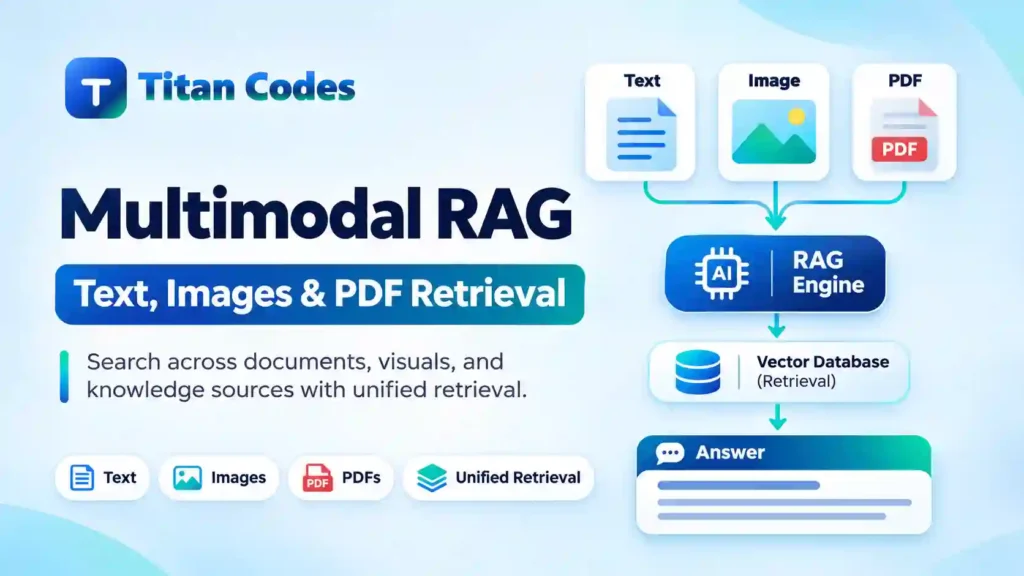
Multimodal RAG addresses this problem by retrieving evidence from text and visual content, then using that evidence to generate an answer.
This guide explains how multimodal RAG works, the different retrieval approaches, and how to build a Python example that searches text, diagrams, and charts inside PDFs.
What Is Multimodal RAG?
Multimodal RAG (Retrieval-Augmented Generation) is an AI architecture that retrieves information from multiple content modalities, such as text and images, and uses that information to generate answers grounded in external sources.
Traditional RAG often retrieves text passages from a knowledge base. Multimodal RAG extends retrieval to information represented visually, including diagrams, screenshots, charts, and document pages.
For example, a multimodal RAG system may answer questions about:
- A paragraph in a policy document
- A chart in a financial report
- A component in an engineering diagram
- A table inside a PDF
- Text visible in a scanned document
- A screenshot in a software manual
The distinction matters because PDF is a file format, not a separate information modality. A PDF may contain ordinary text, images, vector graphics, or scanned pages.
If you are unfamiliar with the underlying architecture, our guide to what a RAG knowledge base is explains how retrieval and language models work together.
Why Does Text-Only RAG Struggle With Images and PDFs?
A typical text-only RAG pipeline extracts document text, splits it into chunks, creates embeddings, and stores them in a searchable index.
That approach works well for ordinary paragraphs. It becomes less reliable when information depends on visual layout.
| Content | Text-Only RAG Limitation |
| Searchable PDF paragraph | Usually works after successful extraction |
| Scanned PDF | Text may require OCR |
| Table | Headers and values may lose their relationships |
| Line chart | Extracted labels may not reveal plotted values |
| Engineering diagram | Arrows and component relationships may be missed |
| Screenshot | Important interface details may be unavailable as text |
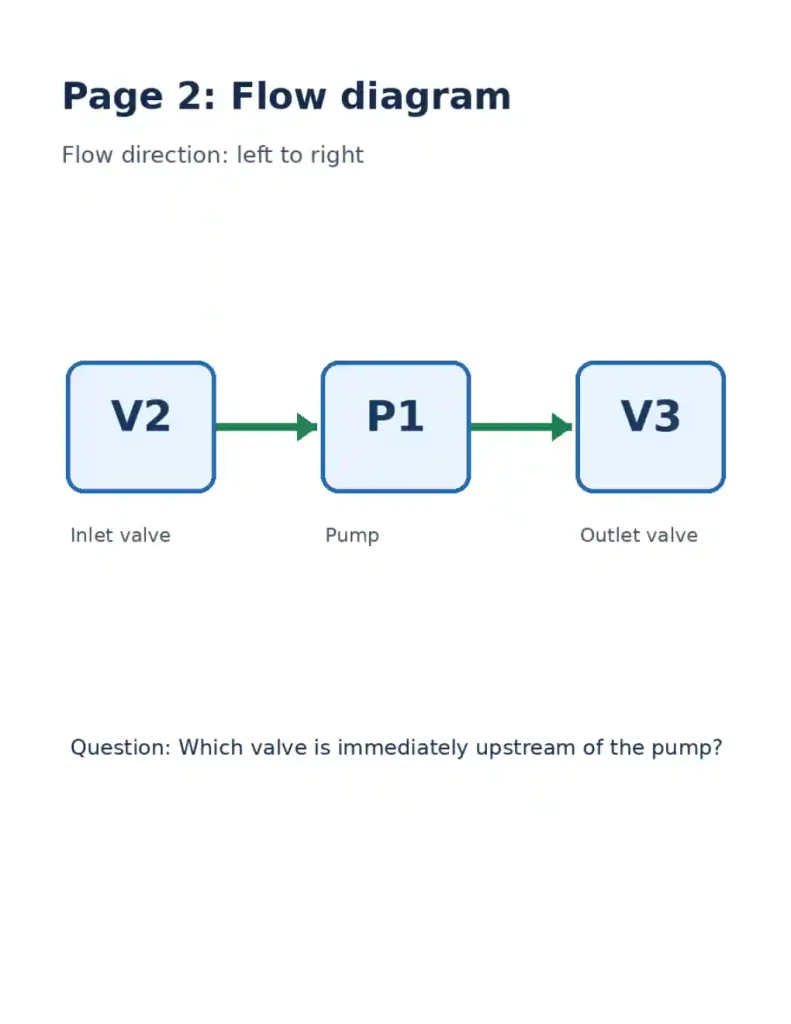
Consider this diagram:
V2 ──────> P1 ──────> V3
Valve Pump Valve
The question is:
Which valve is immediately upstream of pump P1?
The answer is V2.
A text extractor might identify the labels V2, P1, and V3, but the directional relationship may be lost.
Multimodal retrieval can preserve more of that information by processing the diagram itself.
NVIDIA describes these extraction challenges in its technical guide to PDF data extraction for information retrieval.
How Does Multimodal RAG Work?
A multimodal RAG system has two main phases: preparing documents for retrieval and answering questions using the retrieved evidence.
1. Document Ingestion
The system receives PDFs, documents, or image files.
Depending on their format, it may extract selectable text, perform OCR, identify tables, or render pages as images.
A document processor such as Docling can help preserve document structure, including reading order, tables, and page-level information.
2. Text and Visual Processing
Different content types need different treatment.
Text can be divided into meaningful passages.
Tables may need structured extraction so headers remain connected to values.
Images and diagrams may be described by a vision-language model or indexed with a visual embedding model.
Original images should be preserved for later verification.
3. Embeddings and Indexing
An embedding model converts content into numerical representations used for similarity search.
For example:
Text passage → Text embedding
Image description → Text embedding
In a native multimodal retrieval system, an image-aware embedding model can represent visual content directly.
The resulting vectors are stored in a search index, often alongside document and page metadata.
4. Retrieval and Reranking
When a user asks a question, the system searches for relevant content.
The retrieved evidence might include:
- Text passages
- Image descriptions
- Table content
- Original PDF pages
- Visual embeddings pointing to document images
A reranker may then reorder the results to improve relevance before answer generation.
5. Answer Generation With Source Evidence
The retrieved evidence is provided to a language model.
When visual information matters, the original page image can also be sent to a vision-capable model.
The answer should identify the source document and page wherever possible.
The architecture looks like this:
INDEXING
PDF Documents
|
v
Text Extraction + Page Rendering
|
v
Text Chunks + Visual Descriptions
|
v
Embedding Model
|
v
Vector Index + Source Metadata
|
+—— Original Page Images
QUESTION ANSWERING
User Question
|
v
Vector Search
|
v
Relevant Evidence + Original Pages
|
v
Vision-Capable Language Model
|
v
Answer + Source Page
The original document remains the evidence. Its embedding or generated description is only a way to help find that evidence.
Three Ways to Retrieve Text and Images With RAG
There is no single retrieval architecture that fits every project.
The choice depends on document complexity, available infrastructure, accuracy requirements, and cost.
1. Text Extraction and Image Descriptions
This is a practical starting point for smaller applications.
The system extracts document text and uses a vision model to describe images, charts, or diagrams.
Those descriptions become searchable text.
For example, a diagram might produce:
A flow diagram shows valve V2 connected to pump P1, followed by valve V3. Arrows indicate flow from left to right.
A text embedding model can then index that description.
Advantage: Relatively straightforward to implement with existing text vector databases.
Limitation: A description can omit important visual details or describe them incorrectly.
That is why the original image should remain available.
2. Multimodal Embeddings
A multimodal embedding model can represent different content types in a compatible search space.
For example, a text query may retrieve an image based on the image’s visual content rather than depending entirely on a generated description.
This is useful when a document collection contains large numbers of charts, diagrams, or screenshots.
However, not every embedding model supports cross-modal retrieval. A regular text embedding model cannot directly interpret raw image pixels.
3. PDF Page-Image Retrieval With ColPali
Another approach is to treat PDF pages as images.
ColPali is designed for visual document retrieval. It uses vision-language models and multivector representations to retrieve relevant document pages.
This can be useful for visually complex PDFs where layout, figures, or spatial relationships are important.
The tradeoff is additional indexing, storage, and retrieval complexity.
Which Approach Should You Choose?
| Approach | Best Starting Use Case | Main Limitation |
| Text + image descriptions | Small mixed-document applications | Visual details may be lost in descriptions |
| Multimodal embeddings | Large collections of mixed text and images | Model and indexing complexity |
| Page-image retrieval | Visually complex PDFs | More demanding retrieval infrastructure |
For the Python example below, we will use the first approach because it is easier to understand and reproduce.
How to Build a Multimodal RAG Pipeline With Python
We will build a small document assistant that can answer questions using text and visual information from a PDF.
The example uses a fictional equipment maintenance manual containing three pages.
| Page | Content | Question |
| 1 | Text instructions | What happens if pressure exceeds 80 psi? |
| 2 | Flow diagram | Which valve is immediately upstream of pump P1? |
| 3 | Temperature chart | What is the temperature at 20 minutes? |
The PDF is deliberately designed so that page 1 contains selectable text, while pages 2 and 3 contain raster images.
That distinction lets us demonstrate a limitation of text extraction and how image-aware processing can address it.
Step 1: Prepare the Python Project
Use Python 3.11 or later.
Install the dependencies:
pip install pymupdf chromadb openai pillow
Our example uses:
- PyMuPDF for PDF text extraction and page rendering
- Chroma for local vector search
- OpenAI’s API for image descriptions, text embeddings, and answer generation
Store your API key in an environment variable:
export OPENAI_API_KEY=”YOUR_API_KEY”
On Windows PowerShell, use:
$env:OPENAI_API_KEY=”YOUR_API_KEY”
The API calls require a valid account and may incur usage charges. Use only documents you are authorized to process.
Step 2: Extract Text and Render PDF Pages
PyMuPDF can extract text and render each PDF page as an image.
import pymupdf
from pathlib import Path
pdf = pymupdf.open(“maintenance_guide.pdf”)
Path(“pages”).mkdir(exist_ok=True)
for page_number, page in enumerate(pdf, start=1):
text = page.get_text(“text”)
image = page.get_pixmap(dpi=130)
image.save(f”pages/page_{page_number}.png”)
print(page_number, len(text.strip()))
For our prepared test PDF, the text extraction produces the following character counts:
1 221
2 0
3 0
Pages 2 and 3 contain visible information but no selectable text.
A text-only indexing pipeline based solely on page.get_text(“text”) would have no extracted page content from those two pages.
This is the problem our multimodal pipeline needs to address.
The PyMuPDF page documentation describes both text extraction and page rendering.
Step 3: Create Searchable Visual Descriptions
Next, use a vision-capable model to describe each page.
For a flow diagram, the description should record labels and relationships. For a chart, it should identify axes, plotted values, and visible trends when possible.
A simple request looks like this:
import base64
from pathlib import Path
from openai import OpenAI
client = OpenAI()
def describe_page(path):
encoded = base64.b64encode(
Path(path).read_bytes()
).decode(“ascii”)
response = client.responses.create(
model=”gpt-4.1-mini”,
input=[{
“role”: “user”,
“content”: [
{
“type”: “input_text”,
“text”: (
“Describe this page for retrieval. “
“Include exact labels, chart axes, “
“values, and diagram relationships. “
“Do not guess missing details.”
)
},
{
“type”: “input_image”,
“image_url”: (
f”data:image/png;base64,{encoded}”
)
}
]
}]
)
return response.output_text
The OpenAI vision documentation covers image inputs using URLs or Base64-encoded data.
The description becomes a searchable representation of the page.
Important: This is caption-based visual retrieval. We are not directly embedding image pixels into a multimodal vector space.
Step 4: Store Embeddings With Page Metadata
We now need to make extracted text and visual descriptions searchable.
For each record, preserve information such as:
{
“source”: “maintenance_guide.pdf”,
“page”: 2,
“kind”: “visual”,
“image_path”: “pages/page_2.png”
}
Then generate embeddings and store them in Chroma.
import chromadb
db = chromadb.Client()
collection = db.create_collection(“pdf_evidence”)
texts = [
“Stop the pump if pressure exceeds 80 psi.”,
“Valve V2 is upstream of pump P1.”,
“Temperature chart showing pump readings.”
]
embeddings = client.embeddings.create(
model=”text-embedding-3-small”,
input=texts
)
collection.add(
ids=[“page1”, “page2”, “page3”],
documents=texts,
embeddings=[
item.embedding
for item in embeddings.data
],
metadatas=[
{“page”: 1, “kind”: “text”},
{“page”: 2, “kind”: “visual”},
{“page”: 3, “kind”: “visual”}
]
)
The descriptions above are simplified illustrative indexing records. In a working pipeline, the indexed text should come from actual extraction and model-generated descriptions.
Chroma supports storing documents, embeddings, and metadata together. Its Python collection documentation explains the relevant operations.
Step 5: Retrieve Evidence for a Question
Suppose the user asks:
Which valve is immediately upstream of pump P1?
Convert that question into an embedding and search the index.
question = (
“Which valve is immediately upstream of pump P1?”
)
query_vector = client.embeddings.create(
model=”text-embedding-3-small”,
input=[question]
).data[0].embedding
results = collection.query(
query_embeddings=[query_vector],
n_results=2,
include=[“documents”, “metadatas”]
)
The retrieval system should ideally return the diagram description from page 2.
But retrieving a description is only part of the process.
We still need to verify that the original image supports the answer.
Step 6: Verify the Original PDF Page With a Vision Model
The system can use the retrieved page number to locate the rendered page image.
It then sends the original image to a vision-capable model together with the question.
This reduces dependence on the generated description alone.
The model can inspect the actual diagram, including the arrows showing the flow direction.
For our test document, the correct evidence is:
V2 → P1 → V3
That means valve V2 is immediately upstream of pump P1.
A grounded response would read:
Valve V2 is immediately upstream of pump P1. The diagram shows flow from V2 through P1 to V3. Source: Equipment Maintenance Guide, page 2.
This is the expected answer from the synthetic source document, not a reported measurement of a live model run.
Step 7: Check Chart Retrieval
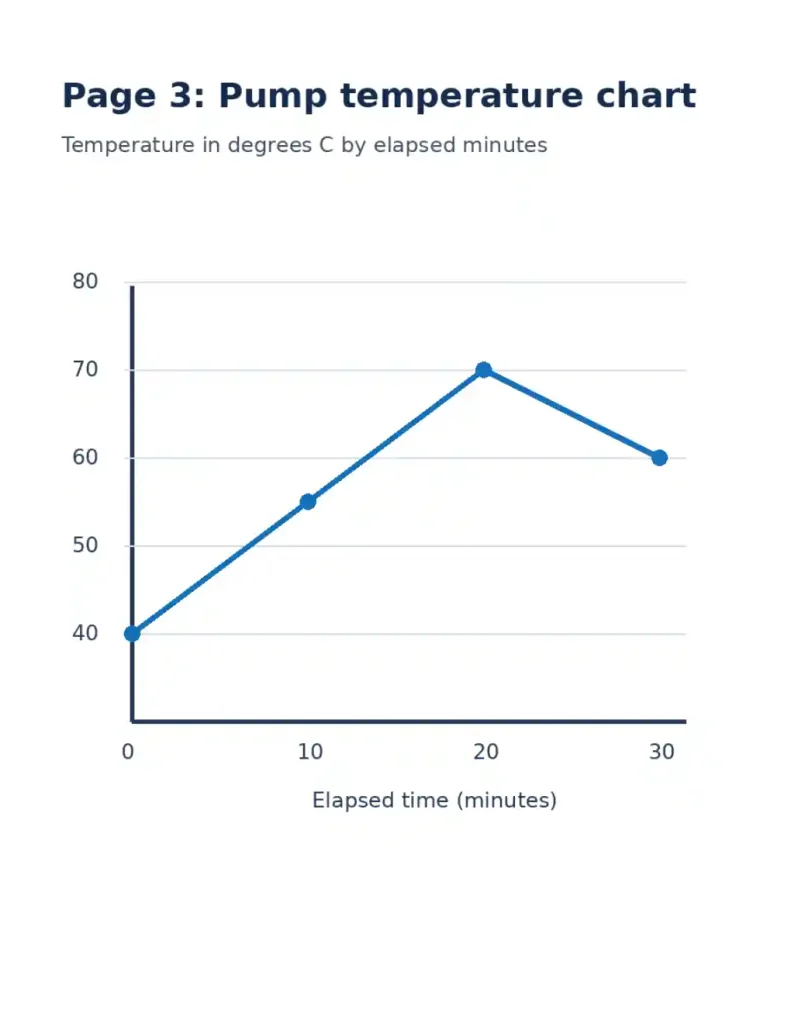
The third page contains a line chart showing pump temperature at different times.
Its test values are:
| Elapsed Time | Temperature |
| 0 minutes | 40°C |
| 10 minutes | 55°C |
| 20 minutes | 70°C |
| 30 minutes | 60°C |
The question is:
What is the pump temperature at 20 minutes?
The correct source answer is 70°C, supported by page 3.
A vision model should inspect the plotted point and axes rather than infer a value solely from a vague caption such as “temperature rises and falls.”
For charts, numeric accuracy matters. A small error in reading an axis can produce a confidently stated but incorrect answer.
What This Prototype Demonstrates
The complete pipeline performs these operations:
- Extract available text from the PDF.
- Render document pages as images.
- Generate searchable visual descriptions.
- Store embeddings and page metadata.
- Retrieve relevant records for a question.
- Reopen original page images.
- Generate an answer using the retrieved source evidence.
It is a functional architecture for a small prototype, but it is not a production-ready document-processing system.
The Multimodal RAG Python demo project also includes a Python script that separates indexing from question answering, so the PDF does not need to be processed again for every question.
How Do You Preserve PDF Page Numbers and Image Sources?
A useful RAG answer should make it possible to inspect the original evidence.
For each indexed item, preserve:
- Source document name or identifier
- Document version
- Page number
- Content type
- Source-element identifier
- Original image or page location
- Bounding-box coordinates when available
For example:
{
“document_id”: “maintenance-v1”,
“file”: “maintenance_guide.pdf”,
“page”: 2,
“content_type”: “diagram”,
“element_id”: “flow-diagram-1”,
“image_path”: “pages/page_2.png”
}
When a match is retrieved, the system can recover the original page through that metadata.
This is particularly important when multiple documents contain similar information.
A generated citation is not automatically a verified citation. The system should ensure that the referenced page actually supports the answer.
For production systems, page-level metadata can be extended with element coordinates so the user can open the document directly at the relevant table, chart, or diagram.
How Do You Evaluate Multimodal RAG Accuracy?
A multimodal RAG system needs to be tested at two levels:
Retrieval quality: Did it find the correct evidence?
Answer quality: Did it interpret that evidence correctly?
For our three-page example, the ground-truth answers are known.
| Test Question | Correct Source | Expected Answer |
| What should happen above 80 psi? | Page 1 | Stop pump, isolate power, inspect filter |
| Which valve is upstream of P1? | Page 2 | V2 |
| What is the temperature at 20 minutes? | Page 3 | 70°C |
A proper evaluation should also include questions the source cannot answer.
For example:
What was the pump’s electricity consumption last month?
The document does not contain that information.
A reliable assistant should say that the evidence is insufficient rather than inventing a figure.
For larger test sets, useful evaluation measures include:
- Recall@k: Whether the correct evidence appears among the top retrieved results
- Answer correctness: Whether the answer matches the source
- Citation accuracy: Whether the cited page supports the claim
- Abstention accuracy: Whether the model declines unsupported questions
- Latency: How long retrieval and generation take
The prepared sample establishes known answers and verifies that two pages lack selectable text. It does not establish a measured accuracy improvement for a particular model.
To make performance claims, run both retrieval pipelines against the same questions and record the results.
Common Multimodal RAG Problems and How to Fix Them
Multimodal document processing introduces failure points beyond ordinary text search.
| Problem | Likely Cause | What to Do |
| Diagram cannot be found | Visual content was not indexed | Add visual descriptions or visual embeddings |
| Wrong chart value | Axis or point was misread | Pass original chart to vision model and verify |
| Table columns are mixed | Table was flattened into text | Preserve table structure and headers |
| Wrong page cited | Metadata was lost | Keep page IDs attached to every record |
| Incomplete image description | Caption omitted details | Retrieve original image or use visual search |
| Poor retrieval relevance | Weak embeddings or chunking | Evaluate retrieval and consider reranking |
| Slow answers | Too many vision calls | Cache page processing and limit evidence |
| Private information exposed | Missing access controls | Apply permissions before retrieval |
One common mistake is to assume that better generation models can compensate for missing evidence.
If the correct diagram never reaches the model, generating a fluent answer does not solve the retrieval problem.
When Should You Use Multimodal RAG Instead of Text-Only RAG?
Not every knowledge base needs image understanding.
If the source documents contain mostly ordinary text, a well-designed text RAG system may be simpler, faster, and less expensive.
Use multimodal processing when the answers depend on visual information.
| Document Collection | Recommended Starting Approach |
| Plain-text knowledge articles | Text RAG |
| Searchable PDFs with paragraphs | Text extraction and RAG |
| Scanned documents | OCR or visual document processing |
| PDFs with tables | Structure-aware extraction |
| Documents with diagrams | Multimodal RAG |
| Reports containing charts | Multimodal RAG |
| Mixed technical manuals | Multimodal RAG |
Multimodal RAG should solve a retrieval problem you actually have.
Adding vision processing to a collection of simple text documents may increase cost without improving the answers.
Which Tools Are Used for Multimodal RAG?
A production system may use different technologies at different stages.
| Component | Common Options |
| PDF text and rendering | PyMuPDF |
| Structured document parsing | Docling, Unstructured |
| OCR | Tesseract, document-processing services |
| Visual understanding | Vision-language models |
| Text embeddings | Text embedding models |
| Visual embeddings | ColPali and other multimodal models |
| Vector search | Chroma, Qdrant, Milvus, Weaviate |
| Orchestration | Python, LangChain, LlamaIndex |
| Answer generation | Language models with appropriate vision support |
These are alternatives and complementary technologies, not tools that must all be installed together.
A small project may only need PyMuPDF, an embedding model, a vector database, and a vision-capable model.
A large document-processing system may require structured parsing, multiple retrieval indexes, reranking, caching, permissions, and evaluation pipelines.
How Titan Codes Approaches Multimodal RAG Systems
At Titan Codes, RAG architecture starts with the information users need to retrieve, how that information is stored, and which sources the system is permitted to access.
A text-based support knowledge base has different requirements from a document assistant that must interpret diagrams, tables, and scanned PDFs.
For multimodal systems, document parsing, retrieval quality, original-source preservation, permissions, response accuracy, and monitoring all need attention.
These considerations fit into Titan Codes RAG Knowledge Base AI Services, which focus on connecting approved business information with searchable, source-grounded AI workflows.
When retrieved information needs to reach existing products, the surrounding API development and integration is also part of building a usable system.
Frequently Asked Questions About Multimodal RAG
What Is the Difference Between RAG and Multimodal RAG?
Traditional text RAG commonly retrieves passages from text documents. Multimodal RAG extends retrieval to additional content types, such as images, diagrams, and visually structured document pages. Both approaches use retrieved information to support answer generation.
Can Multimodal RAG Read Charts and Diagrams Inside PDFs?
Yes, when the system includes suitable visual processing and retrieval components. A vision-capable model can interpret chart labels, plotted values, arrows, and diagram relationships. However, visual interpretation is not guaranteed to be correct, so important answers should be verified against the original source.
Does Multimodal RAG Always Require OCR?
No. Searchable text can often be extracted directly from PDFs. Scanned pages may require OCR, while visual retrieval methods can work with document images. The correct approach depends on the content and how much structured information needs to be recovered.
Can You Build Multimodal RAG Without a GPU?
Yes. A lightweight prototype can use hosted vision and embedding APIs without requiring a local GPU. Self-hosting large vision or multimodal embedding models may require substantial GPU resources depending on the models and workload.
What Is the Difference Between Image Captions and Multimodal Embeddings?
Image captions convert visual information into natural-language descriptions that can be indexed with text embeddings. Multimodal embeddings represent visual content directly in a compatible search space. Captions are simpler to integrate, but they may omit information that a visual retrieval model could preserve.
Final Thoughts
Multimodal RAG is useful when important information cannot be recovered reliably from text alone.
A good system should retrieve the right paragraph, chart, table, or diagram, preserve its original source, and generate an answer that can be checked.
For text-heavy documents, ordinary RAG may be enough. For visually complex PDFs, multimodal retrieval adds another way to reach information that text extraction can miss.
The goal is not to process every document with the most complex model available. It is to retrieve the correct evidence and make that evidence useful.